EcommerceIQ — Market Insights Ai-ssistance

AI Rank Monitor

Two tools in one — track how ChatGPT, Claude, Gemini, Perplexity & Google AI Mode rank your brand and your products against the competition

A step-by-step guide
01

Why AI Rank Monitor

Buyers ask AI before they buy — see whether AI recommends your brand and your products

Ai-ssistance EcommerceIQ — Market Insights
Concept

From SEO to GEO

Your customers increasingly ask ChatGPT, Gemini, or Perplexity “what’s the best skincare brand?” — and act on the answer. AI Rank Monitor measures whether those models name and rank your brand — and your individual products — the way you used to track Google rankings.

SEO → GEO SEO is about ranking on Google. GEO — Generative Engine Optimization — is about being recommended inside AI answers. This tool is your GEO dashboard.
Real buyer questions It asks each AI the questions your customers actually ask — so a mention is earned, not prompted.
You vs competitors Every score is relative: where you stand against the rivals AI drops into the same answer.
Ai-ssistance EcommerceIQ — Market Insights
Two tools, one platform

Brand Monitor vs Product Monitor

AI Rank Monitor has two tabs. Pick the one that matches the question you’re asking.

Brand Monitor Tracks your whole brand against competitor brands. “What’s the best skincare brand?” — category-level visibility.
Product Monitor Drills into one product line against rival product lines. “Which Cetaphil moisturizer beats CeraVe?” — product-level visibility.
When to use which Start with Brand Monitor for the big picture; switch to Product Monitor to defend or grow a specific product line.
Ai-ssistance EcommerceIQ — Market Insights
How it works

One brand or product, five AI providers, one scoreboard

Give it a brand (or a product line). It writes buyer questions, sends them to five AI providers, reads every answer, and scores how often — and how highly — each one gets recommended. All five answer from a live web search and cite what they read, so every score traces back to real pages on the Sources tab. Google and Google AI Mode stay separate: Google AI Mode reads Google’s AI Overviews.

Brand / product
Your brand or
product line
→
5 AI providers
OpenAIAnthropicGooglePerplexityGoogle AI Mode
→
Scores out
VisibilityShare of VoiceRankingSentiment
1 · Ask Up to 20 buyer questions per analysis, written in your market’s language.
2 · Detect Every answer is scanned for mentions, list position, and (for brands) sentiment.
3 · Score Rolled up into Visibility, Share of Voice, and rankings.
Ai-ssistance EcommerceIQ — Market Insights
Read the numbers

The numbers you’ll see

Defined once here. The result screens just show you where each lives — and where Brand and Product differ.

Visibility Score How much of the answer space you own, 0–100. Mostly how often an AI names you; where you rank nudges it. It’s a score, not a percentage: read it against your competitors’, not on its own.
Share of Visibility Your Visibility as a slice of everyone’s, the donut headline. Zero-sum: it falls when a competitor gains, even if your own score held. 16.4% = a sixth of the attention in your set.
Share of Voice Of every brand mention one AI made, the share that named you. Per AI, in Provider Rankings. Mentions only: position and sentiment don’t enter it. That’s what separates it from Share of Visibility.
Coverage vs Score Both matrices show 0–100 cells measuring different things. Brand’s is Coverage, the % of prompts that named you. Product’s is a rank Score. Never compare the two.
Sentiment The tone of the answers that named you, per AI. One majority verdict, not a scale: a “positive” can still hide a negative answer or two. Read those in Questions & Responses. Brand Monitor only.
Ai-ssistance EcommerceIQ — Market Insights
02

Brand Monitor

Track your whole brand — from a name to live results

Ai-ssistance EcommerceIQ — Market Insights
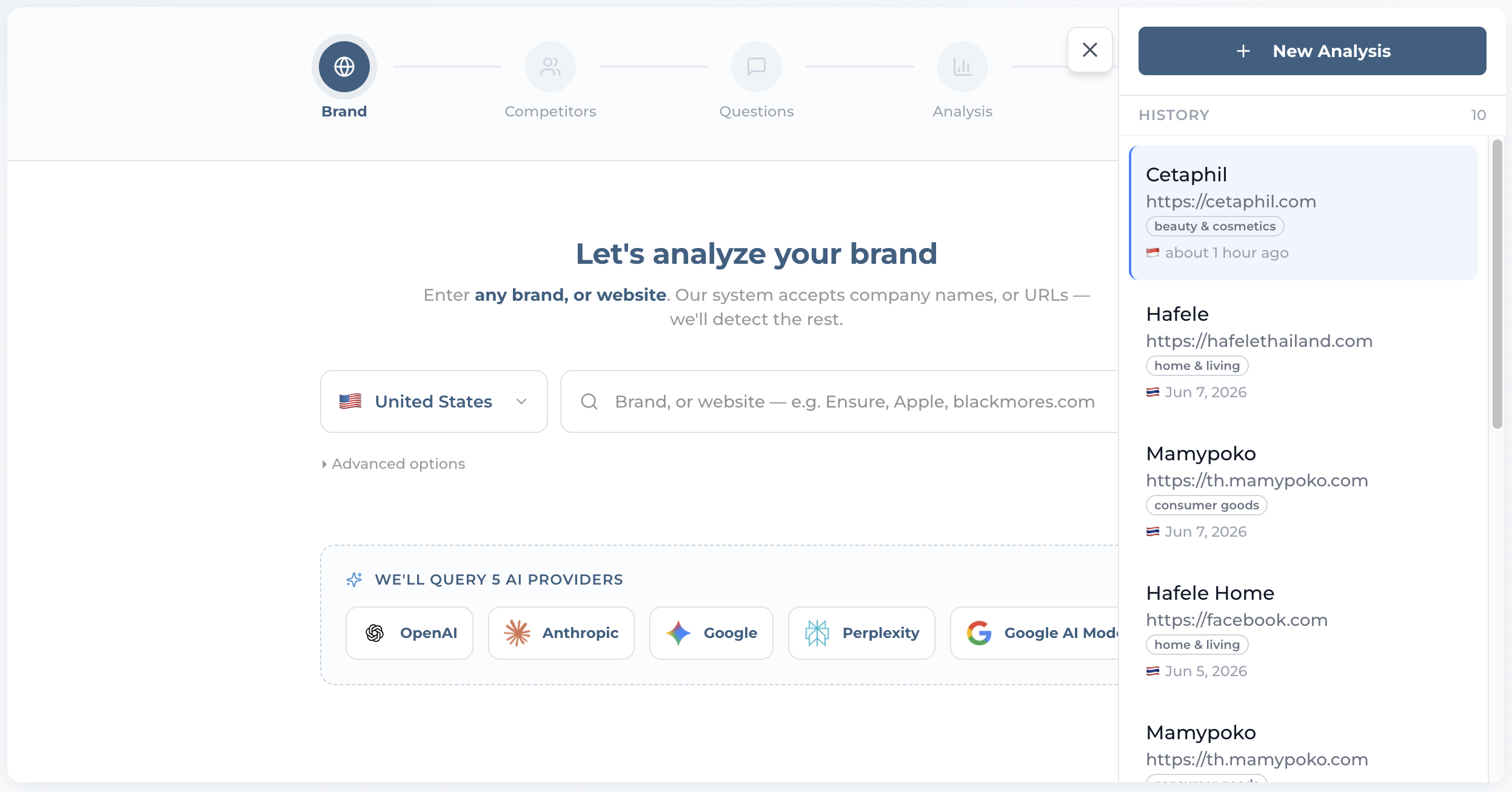
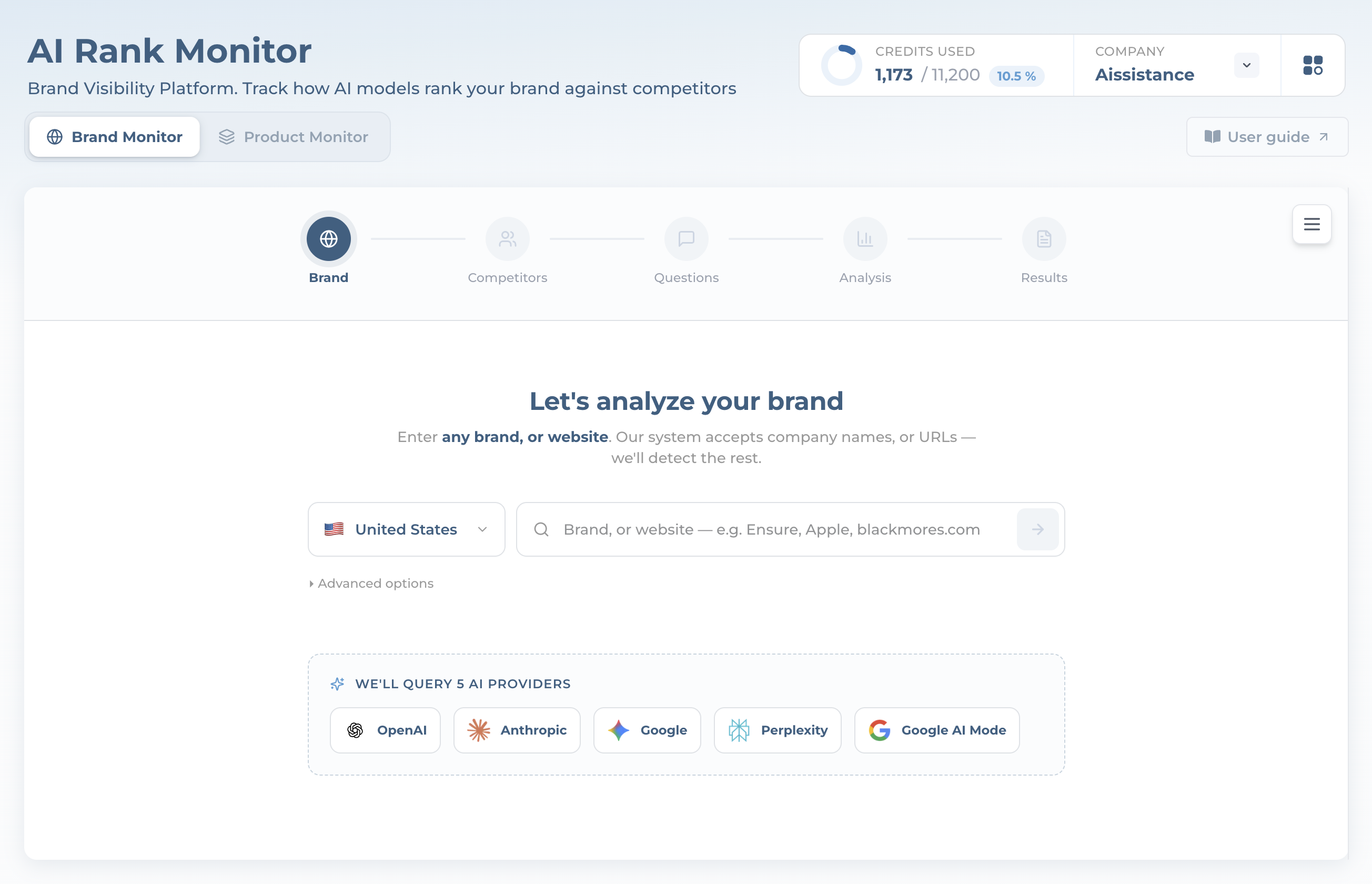
AI Rank Monitor landing screen with Brand Monitor and Product Monitor tabs and five AI provider chips
Step 1

Open AI Rank Monitor

  • The page opens on Brand Monitor. Two tabs sit up top — Brand Monitor (whole brand) and Product Monitor (a product line)
  • A dashed panel names the five AI providers each question runs against: OpenAI, Anthropic, Google, Perplexity, and Google AI Mode
  • Top right shows credits used and your organization; the User guide button opens this deck
Ai-ssistance EcommerceIQ — Market Insights
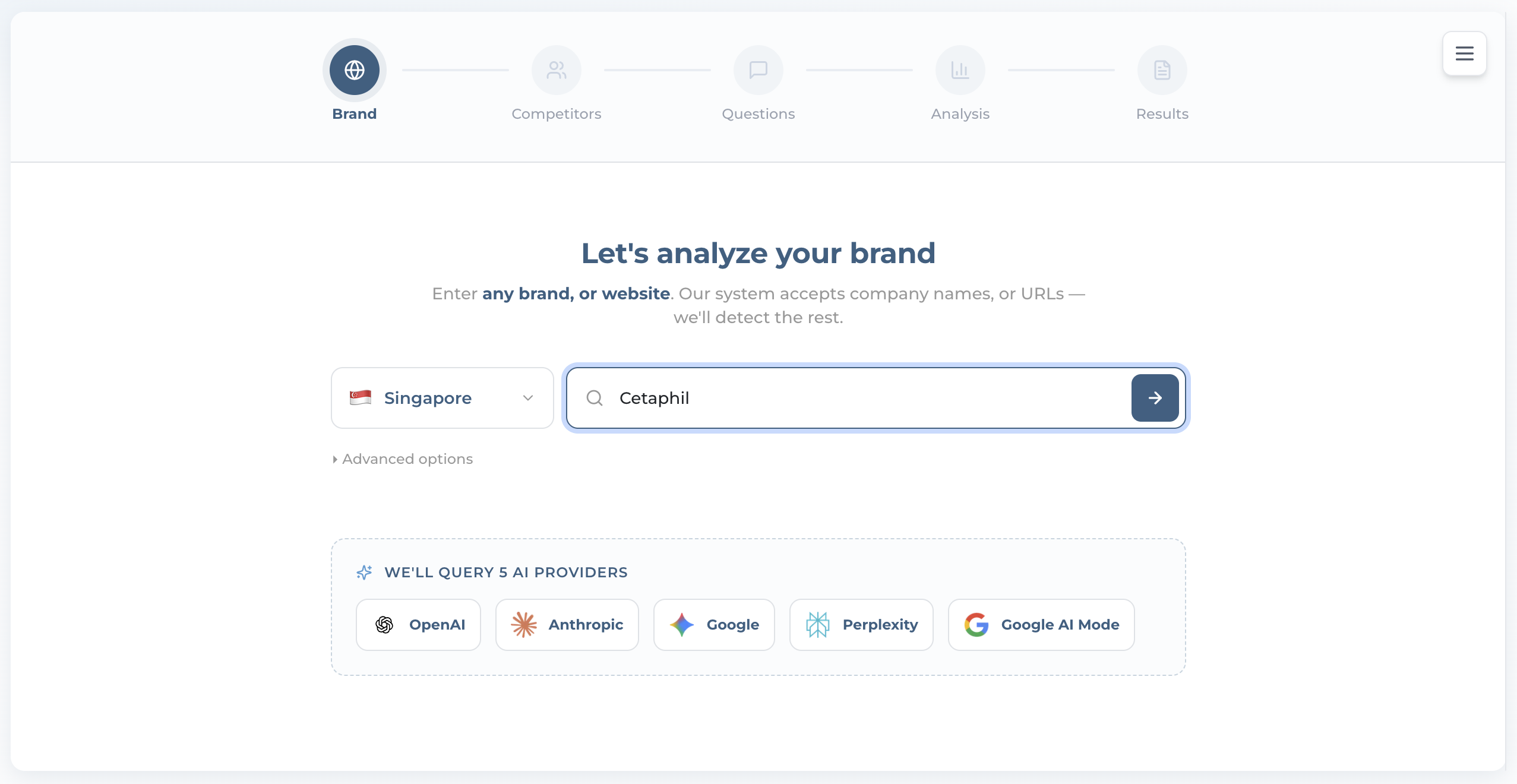
Brand input with the market locale set and a brand typed into the search box
Step 2

Enter Your Brand & Market

  • Pick the market (locale) first — the questions and brands AI surfaces depend on it, so the wrong market gives the wrong answers
  • Type a brand name — e.g. Cetaphil. A name works better than a URL: even with no website, AI Mode can profile it. A URL is optional
  • Advanced options lets you set Question language separately (default “Auto — match market”). Identifying the company is free
Ai-ssistance EcommerceIQ — Market Insights
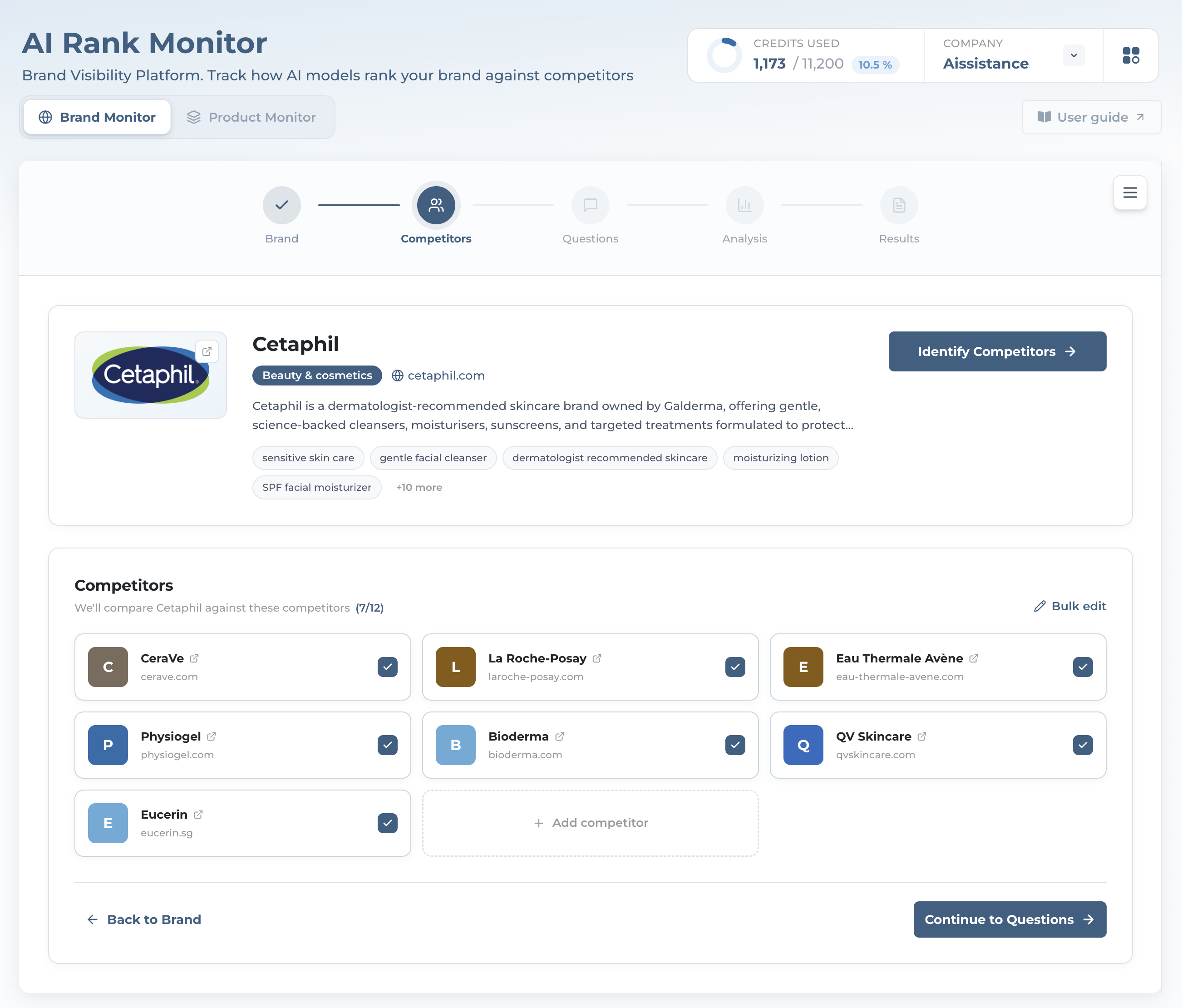
Company card for Cetaphil plus the auto-discovered competitor grid
Step 3

Confirm the Company & Pick Competitors

  • AI Rank Monitor profiles the brand — industry, description, keywords — even from just a name
  • It auto-discovers up to 12 competitors, all selected by default. Toggle any off, + Add competitor, or Bulk edit — they define your scoreboard
  • Click “Continue to Questions →”. Finding competitors is still free
Ai-ssistance EcommerceIQ — Market Insights
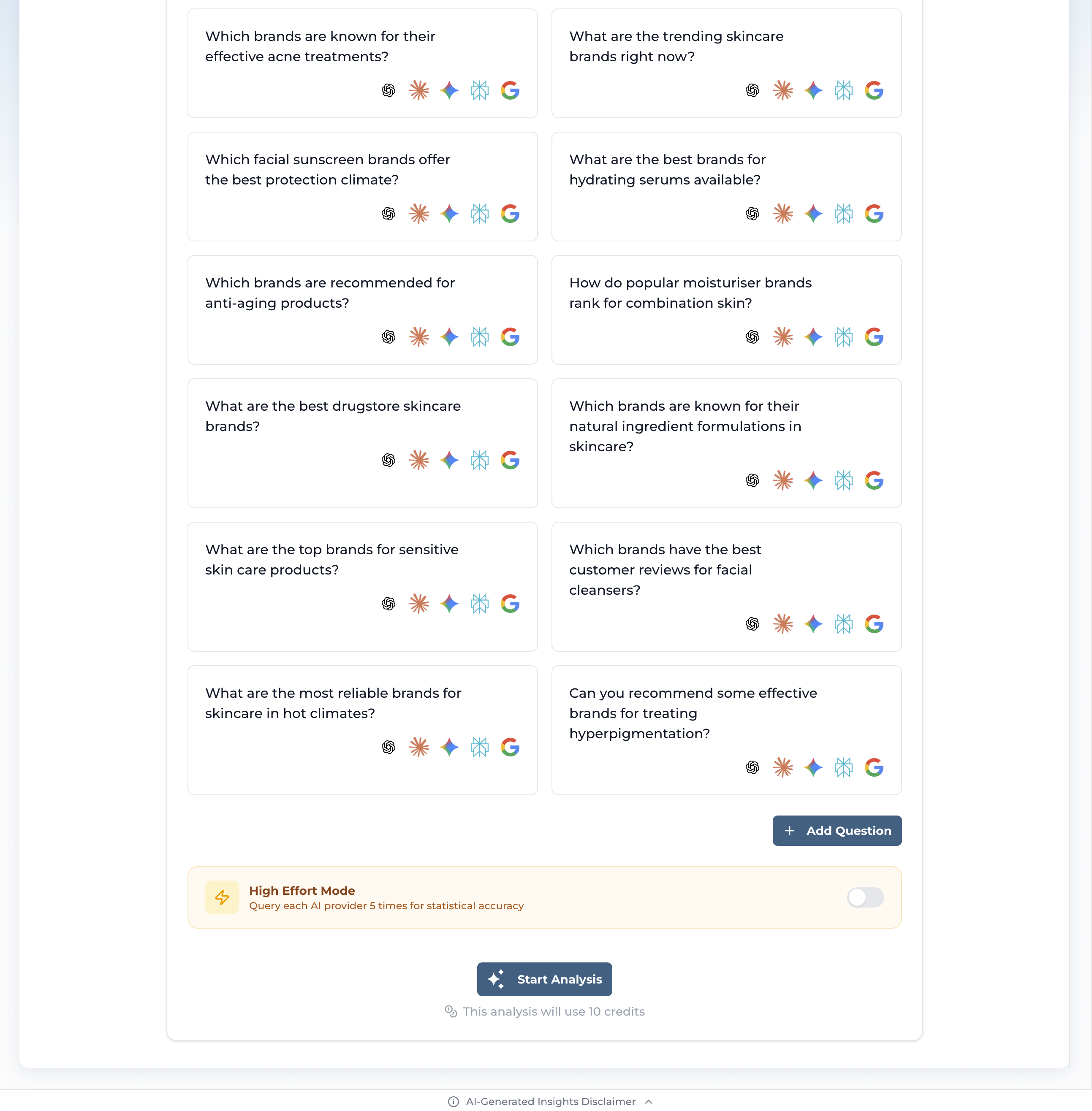
AI-generated buyer questions, each with five provider icons, and the High Effort toggle
Step 4

Review the Questions

  • AI writes up to 20 buyer questions in your market’s language — none of them names your brand, so a mention is earned. Edit, remove, or “+ Add Question” (up to 50)
  • Flip High Effort Mode to ask each provider 5× instead of once — steadier scores, higher cost
  • “Start Analysis” fires every question at all five providers
Cost: 10 credits per analysis (20 in High Effort), charged when the analysis runs. Earlier steps are free
Ai-ssistance EcommerceIQ — Market Insights
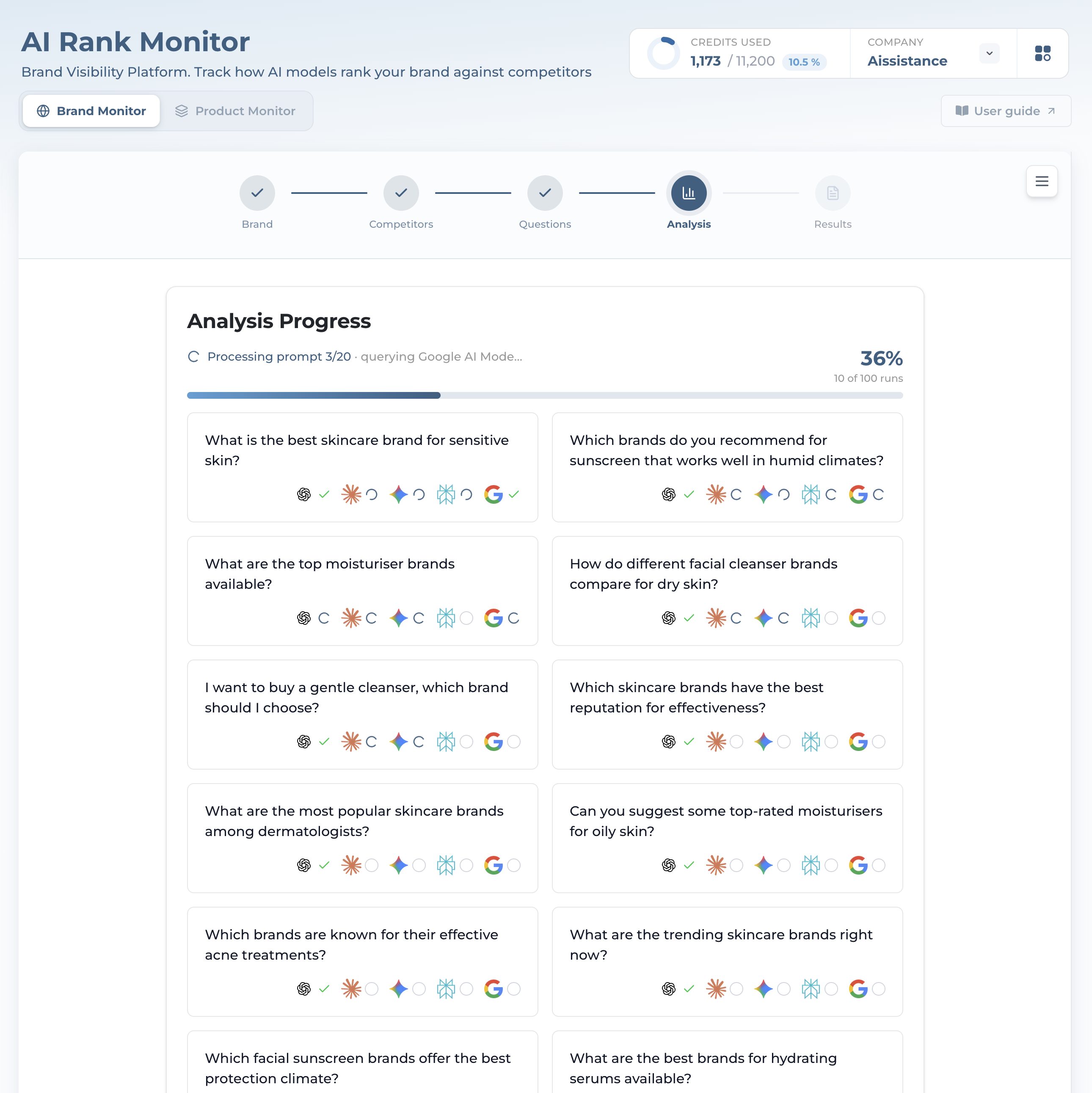
Live analysis progress with per-provider status icons and a live stat strip
Step 5

Watch It Run

  • Each question shows a live status per provider — a spinner for running, a green check for done, grey for skipped
  • A live stat strip counts up: prompts run, brand mentions detected, and competitors found
  • Up to 20 questions × 5 providers is up to 100 runs (×5 samples in High Effort); the count badge on the tab is the real number. Results open automatically when it finishes
Ai-ssistance EcommerceIQ — Market Insights
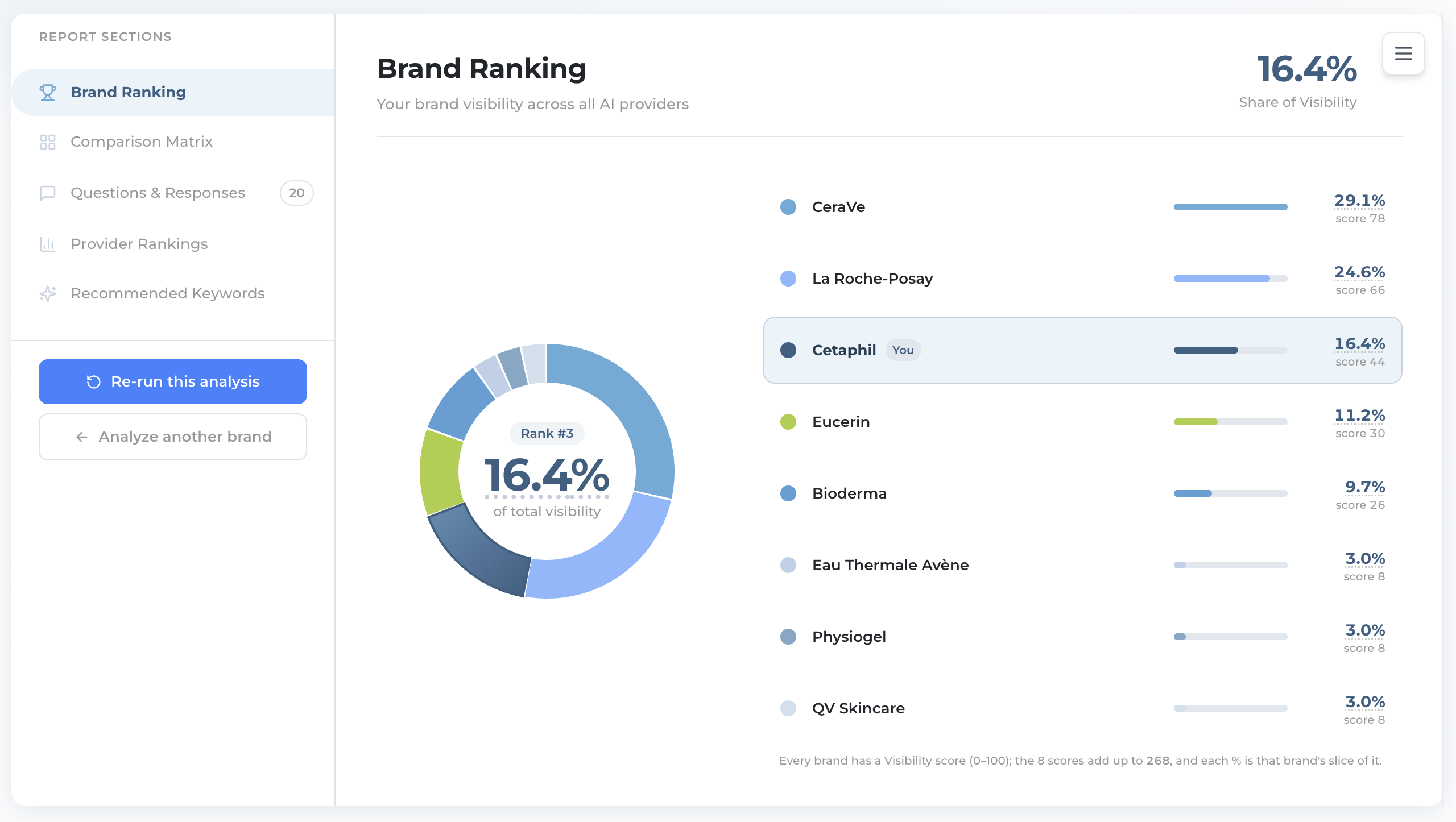
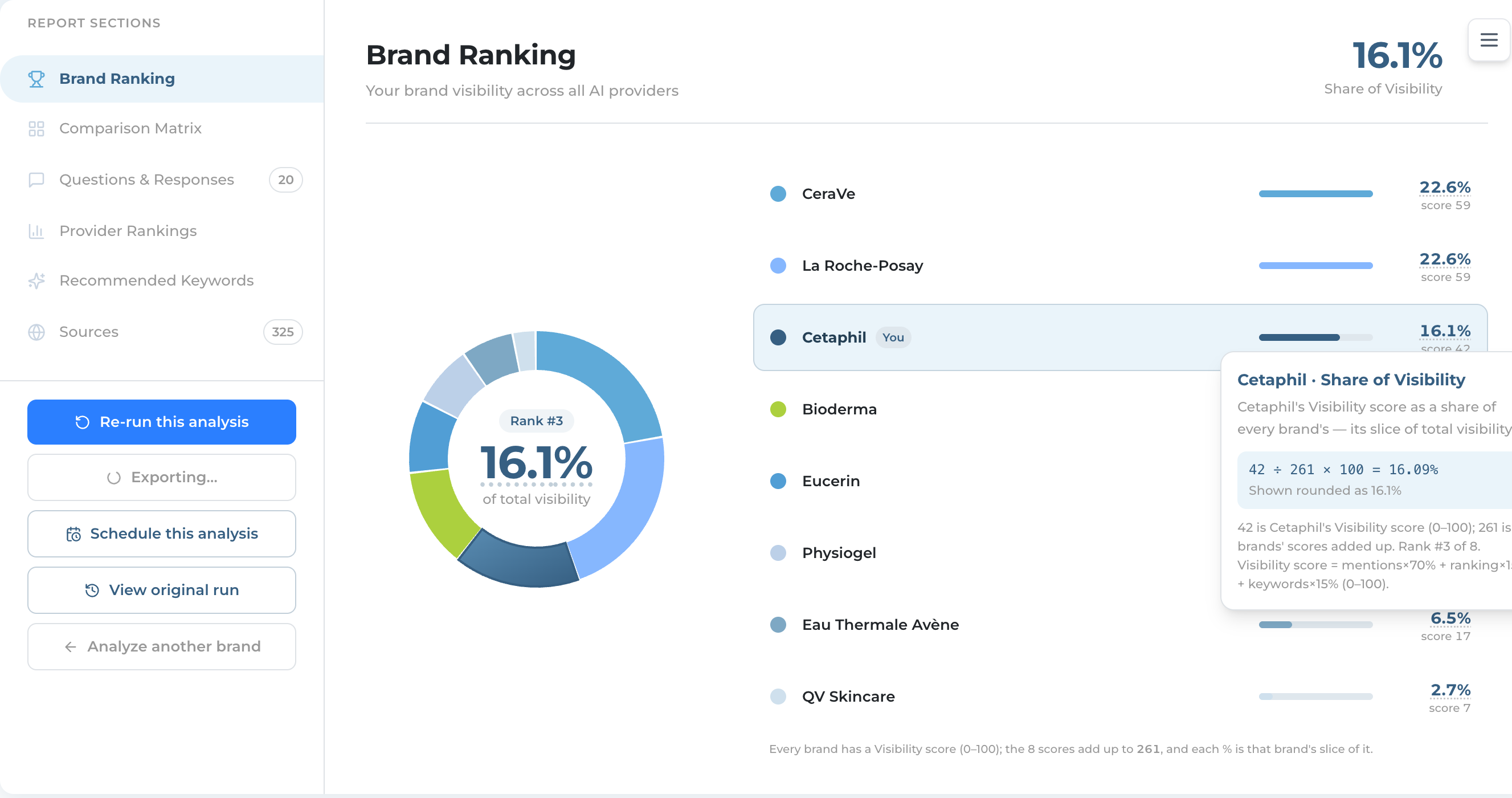
Brand Ranking donut with Cetaphil at Rank 3 and a ranked legend of competitors
Results · Brand Ranking

Where You Rank Overall

  • The donut splits total visibility across every brand. The centre shows your rank and Share of Visibility — Cetaphil lands Rank #3 at 16.4%
  • The ranked legend reads top to bottom with a bar and raw Visibility score per brand; a “You” pill marks you. It names the top 8 and folds the rest into Other, but pins you as your own row even when you rank below 8th
  • Footnote: every brand has a Visibility score (0–100); those scores add up to a total, and each % is that brand’s slice of it
Ai-ssistance EcommerceIQ — Market Insights
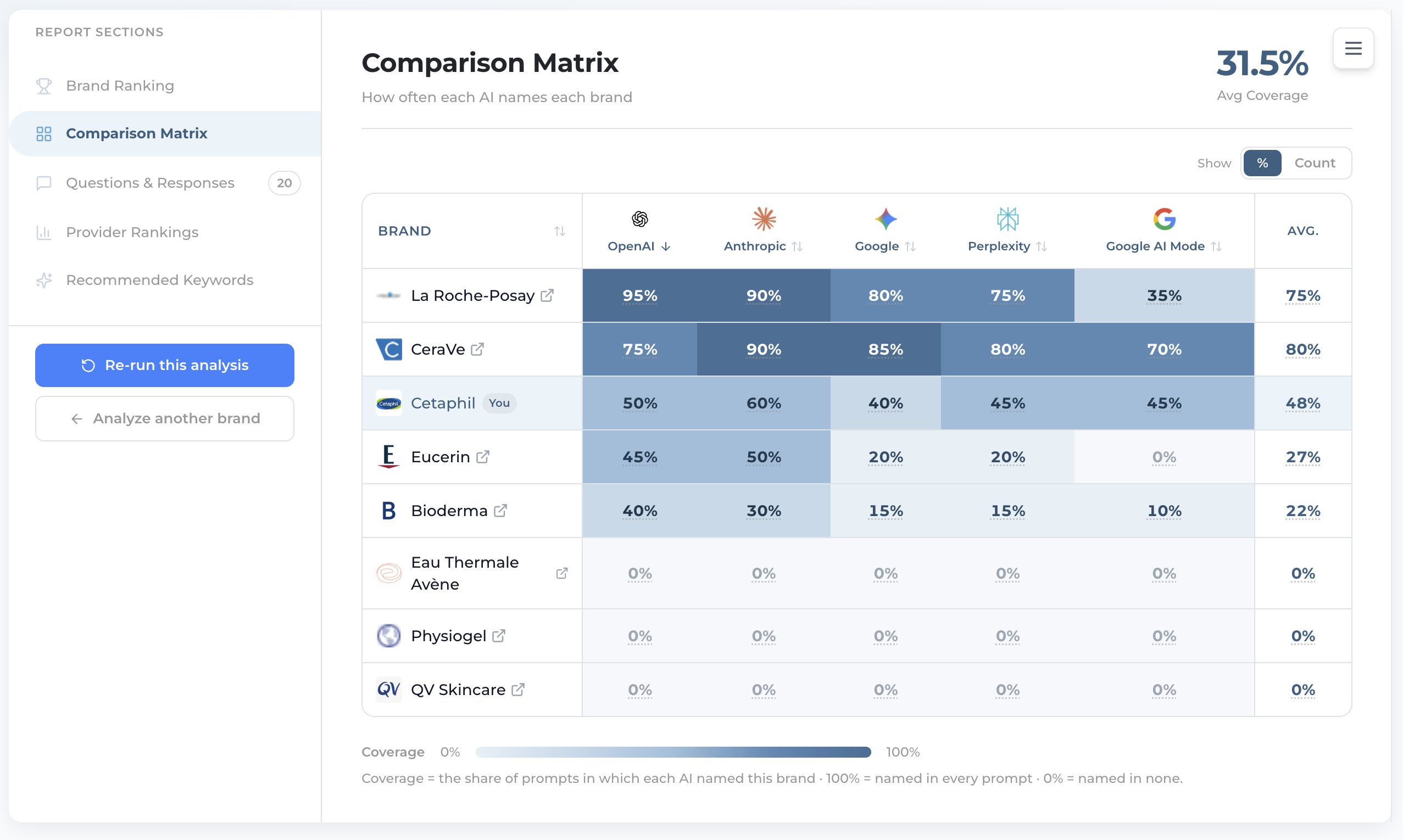
Comparison Matrix heat-map of brands by AI provider with an average column
Results · Comparison Matrix

Who Wins on Which AI

  • A heat-map: brands down the rows, the five AIs across the columns, plus an average. Darker = stronger
  • Each cell is Coverage % — how often that AI named the brand across the prompts. 100% = named in every prompt; 0% = never. Toggle % / Count
  • The KPI up top is Avg Coverage across every brand. Scan a column to see which AI favours which brand
Ai-ssistance EcommerceIQ — Market Insights
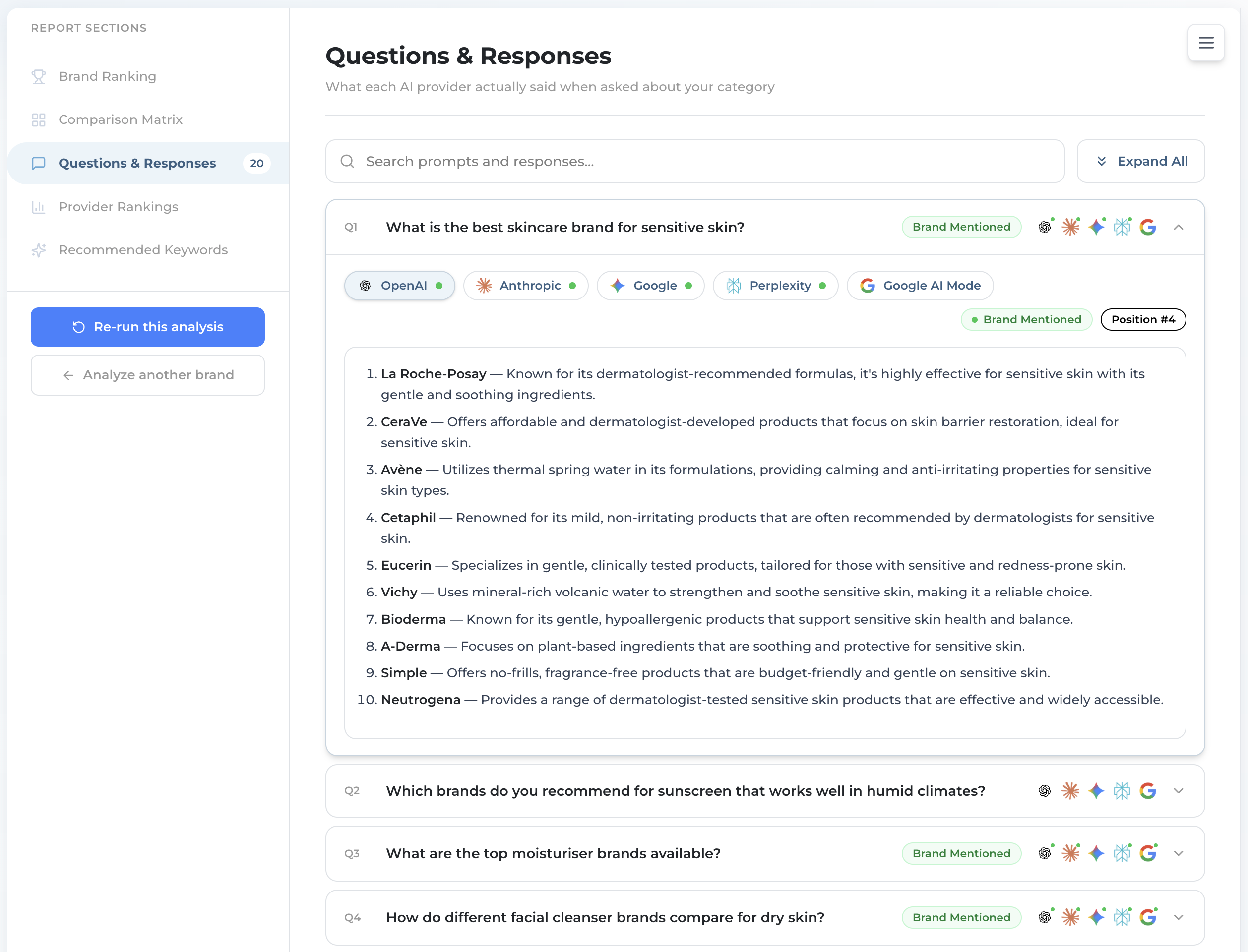
An expanded question showing a provider's verbatim answer with the brand ranked and a position tag
Results · Questions & Responses

What Each AI Actually Said

  • Read each provider’s answer verbatim. A green “Brand Mentioned” badge and a “Position #N” tag tell you where you landed
  • Switch provider tabs to compare wording across OpenAI, Anthropic, Google, Perplexity, and Google AI Mode
  • This is your evidence layer — the exact text behind every score, so you can see why a competitor outranked you
Ai-ssistance EcommerceIQ — Market Insights
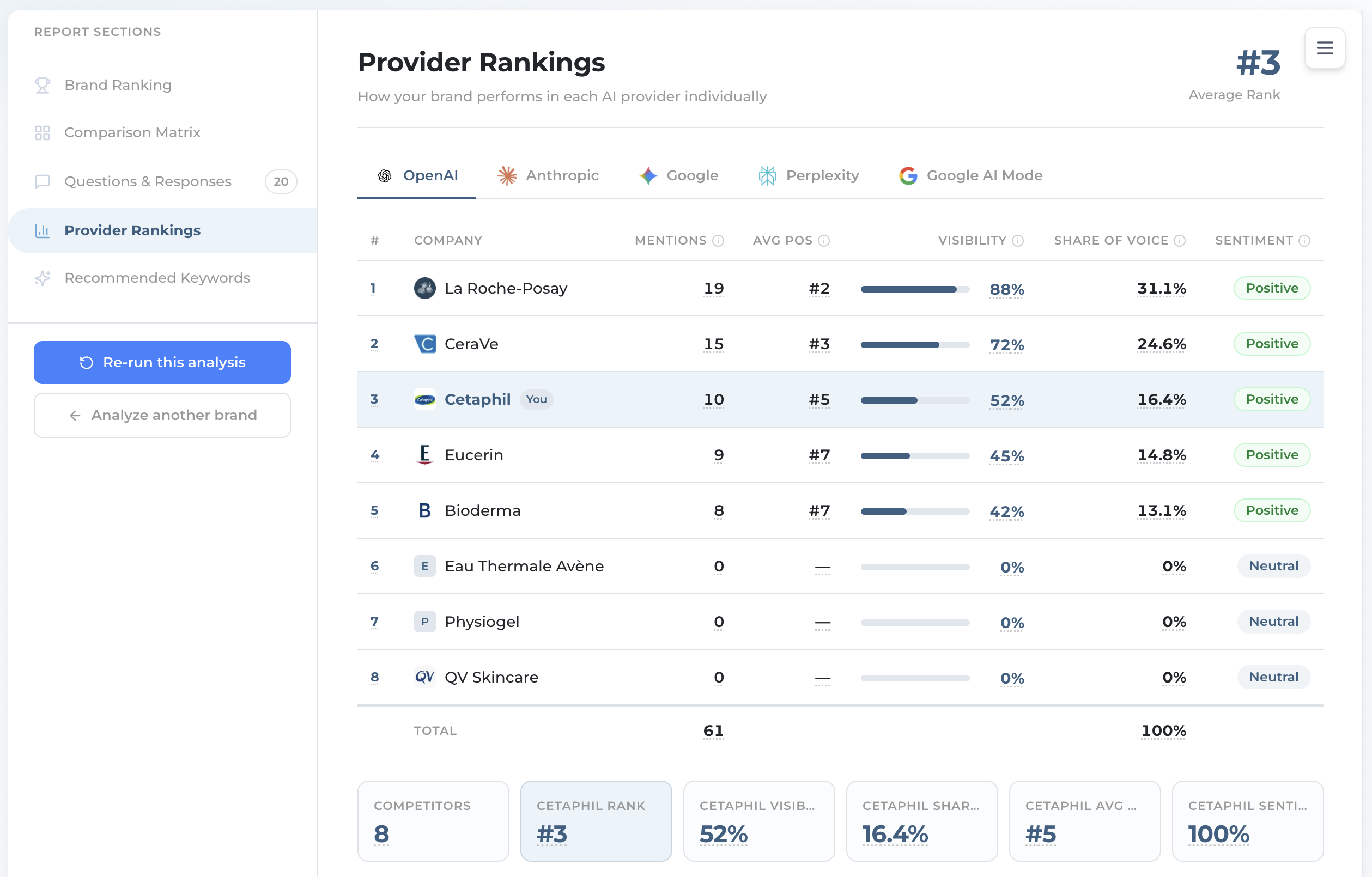
Provider Rankings table for one AI with mentions, average position, visibility, share of voice and sentiment
Results · Provider Rankings

Drill Into One AI

  • Pick one AI. The table ranks every brand by Visibility, with Mentions, Avg Pos, Share of Voice and Sentiment beside it. KPI: Average Rank
  • Stat cards summarise your standing there: rank, visibility, share of voice, average position, sentiment
  • Under the table sit three charts: a Share of Voice bubble (top-right = more voice, better rank), the Visibility breakdown — next slide — and Position across all AIs, a bump line where a gap means that AI didn’t rank you
Ai-ssistance EcommerceIQ — Market Insights
Visibility breakdown bar showing Mention, Listed and Position making up the 0-100 score
Results · Provider Rankings

How the Visibility Score Is Built

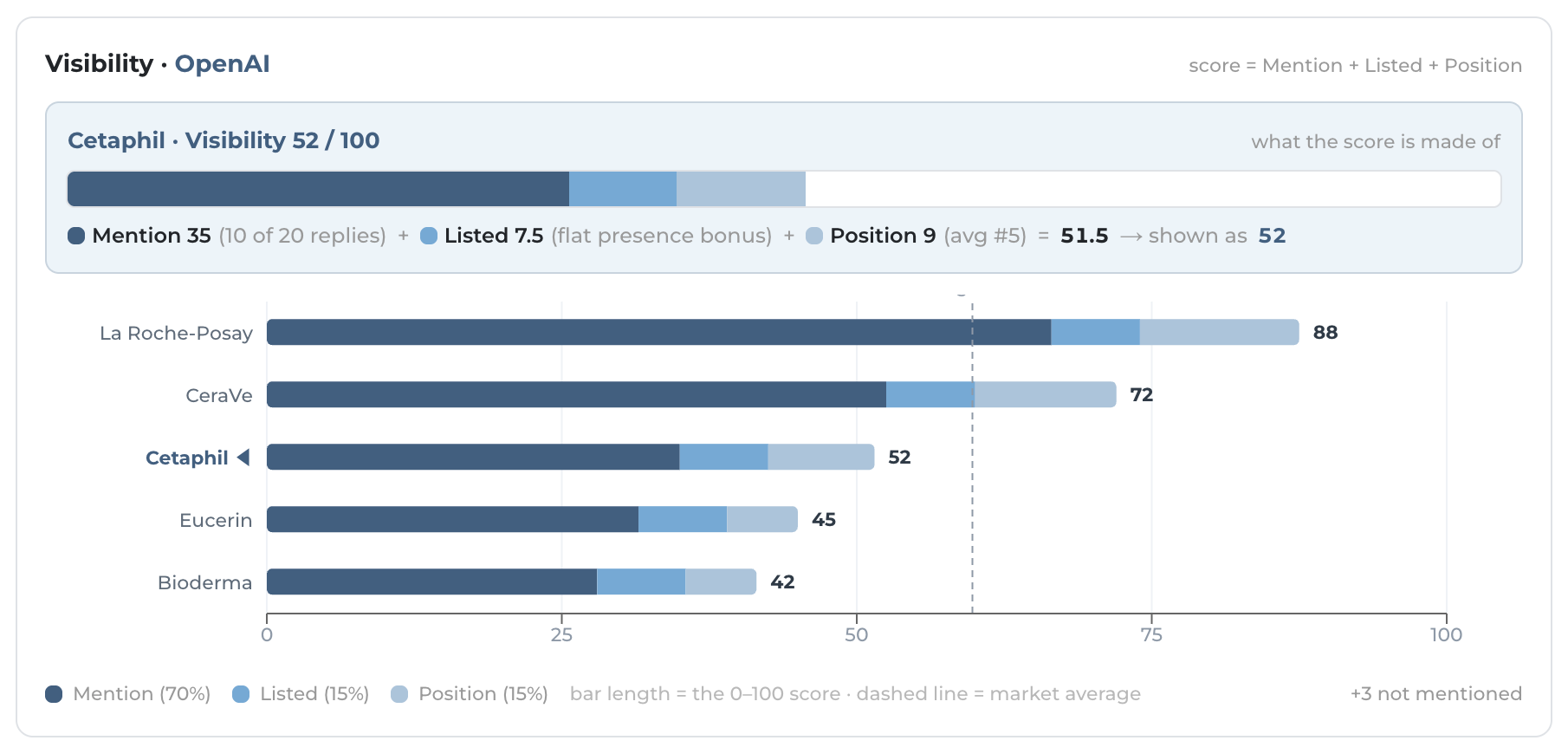
  • The second chart under the Provider Rankings table — titled Visibility · {the AI you picked} — opens the score up. There’s no separate “Visibility” tab; it lives here, per AI
  • On the AI you’ve selected, Visibility (0–100) is Mention 70% + Listed 15% + Position 15%. Mention = how many replies named you (the main driver). Listed = a flat bonus every named brand gets, so it doesn’t separate them. Position = where you land in the list
  • Each brand is one stacked bar, and the dashed line marks the market average — so you can see who’s above or below it at a glance
Ai-ssistance EcommerceIQ — Market Insights
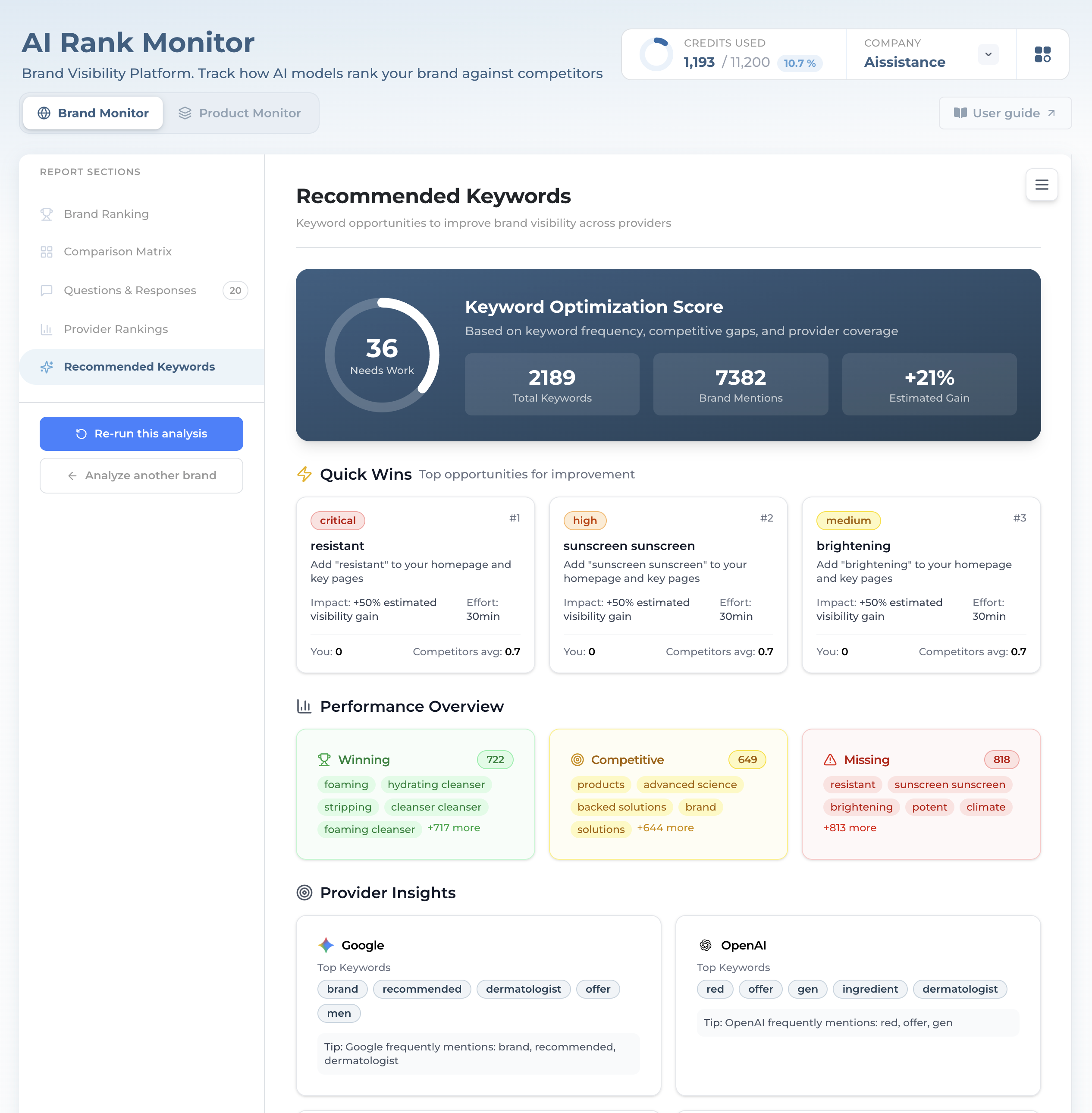
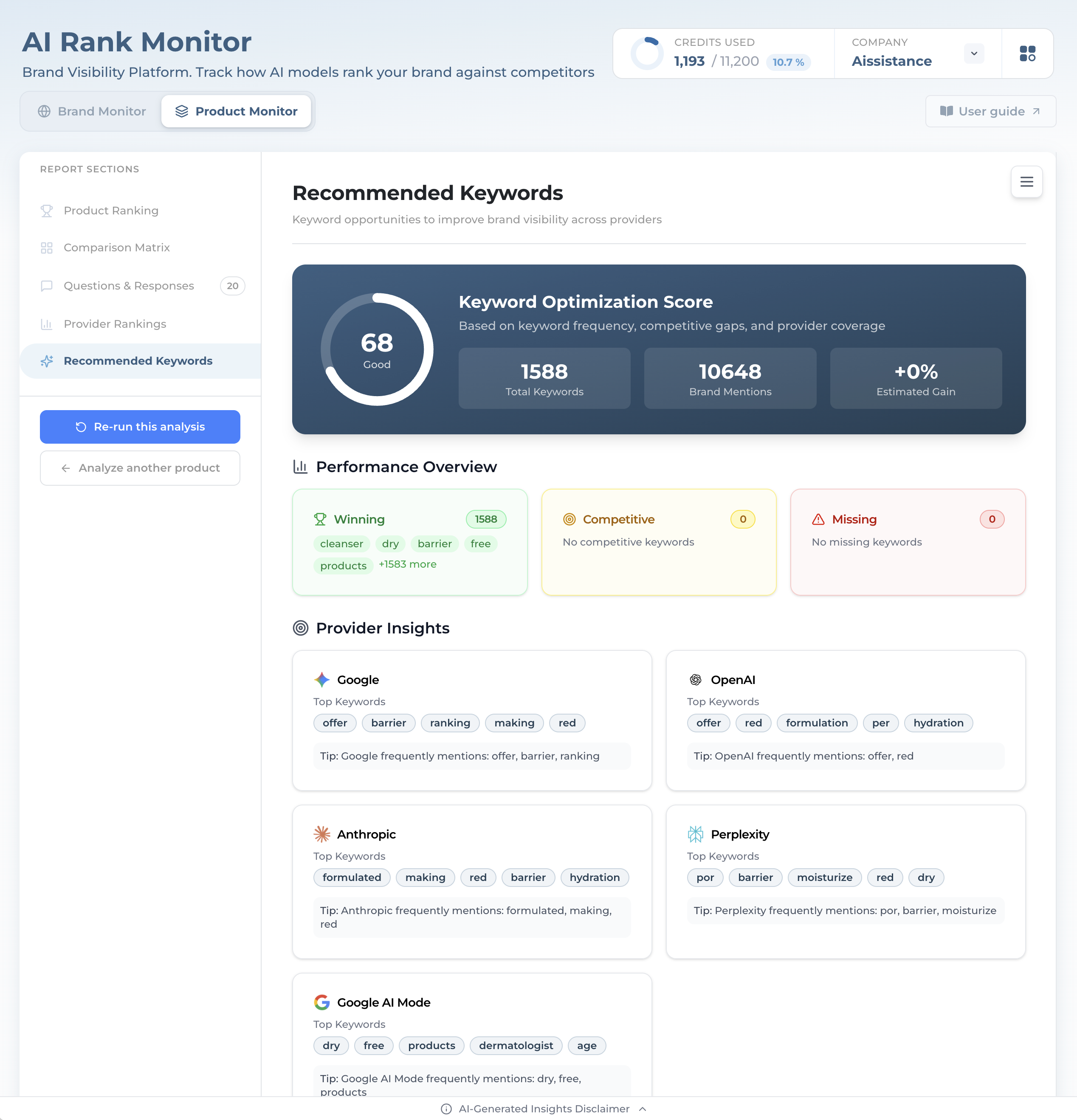
Recommended Keywords with a keyword optimization score, quick wins, performance buckets and provider insights
Results · Recommended Keywords

Where to Improve

  • A Keyword Optimization Score (0–100) based on keyword frequency, competitive gaps, and provider coverage
  • Quick Wins are your top 3 opportunities: the words competitors most out-own you on
  • Performance Overview sorts every keyword by how much of its mentions you own
    • Winning: you own most mentions of that word
    • Competitive: you and your rivals split it
    • Missing: rivals own it. This is the content backlog Quick Wins is drawn from
  • Provider Insights gives each AI its own card: the six keywords it leans on most, plus one tip. Use it to see which AI to write for
  • At the bottom, Full Keyword Analysis lists every keyword in a searchable table, filterable by category, sortable by Gap, with Export CSV. This is the list a content team works from
Ai-ssistance EcommerceIQ — Market Insights
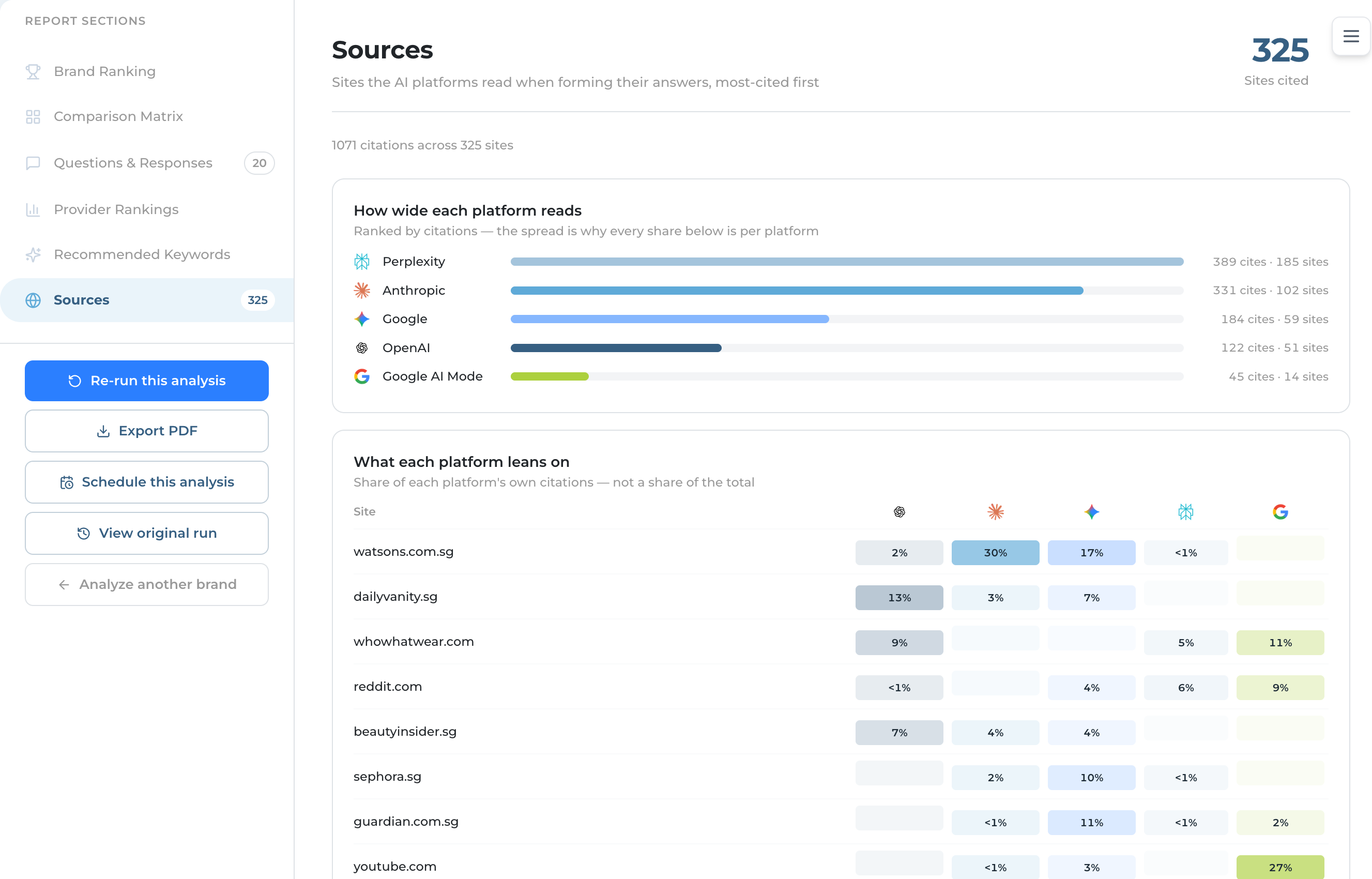
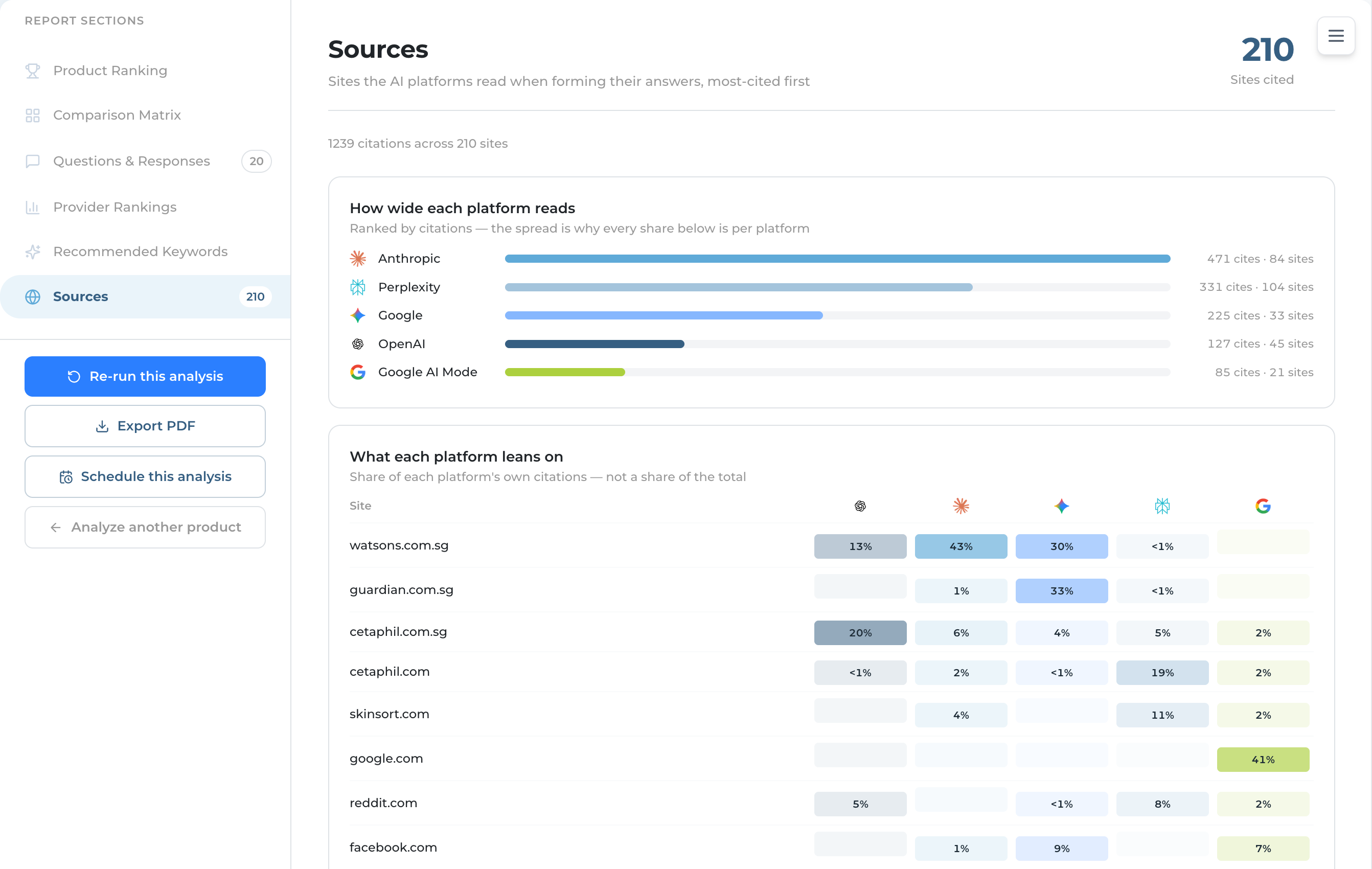
Sources tab with the platform reach chart, the platform-by-site heat map and cards of the most-cited sites
Results · Sources

Where the Answers Came From

  • Every AI now searches the web before it answers, and Sources — the last tab — lists the sites it read. The header counts them: “N citations across M sites”
  • Three charts sit on top: How wide each platform reads (citations and sites per AI), What each platform leans on (a site × AI heat-map), and Where to show up (the top 15 sites and which AIs reach each)
  • Below them, one card per site — the AIs that cited it, the count, and every cited page as a link. These are the pages worth influencing
Citation capture started 27 July 2026. Older analyses show “No sources recorded” — re-run to collect them
Ai-ssistance EcommerceIQ — Market Insights
03

Product Monitor

Zoom into one product line and track it against rival products

Ai-ssistance EcommerceIQ — Market Insights
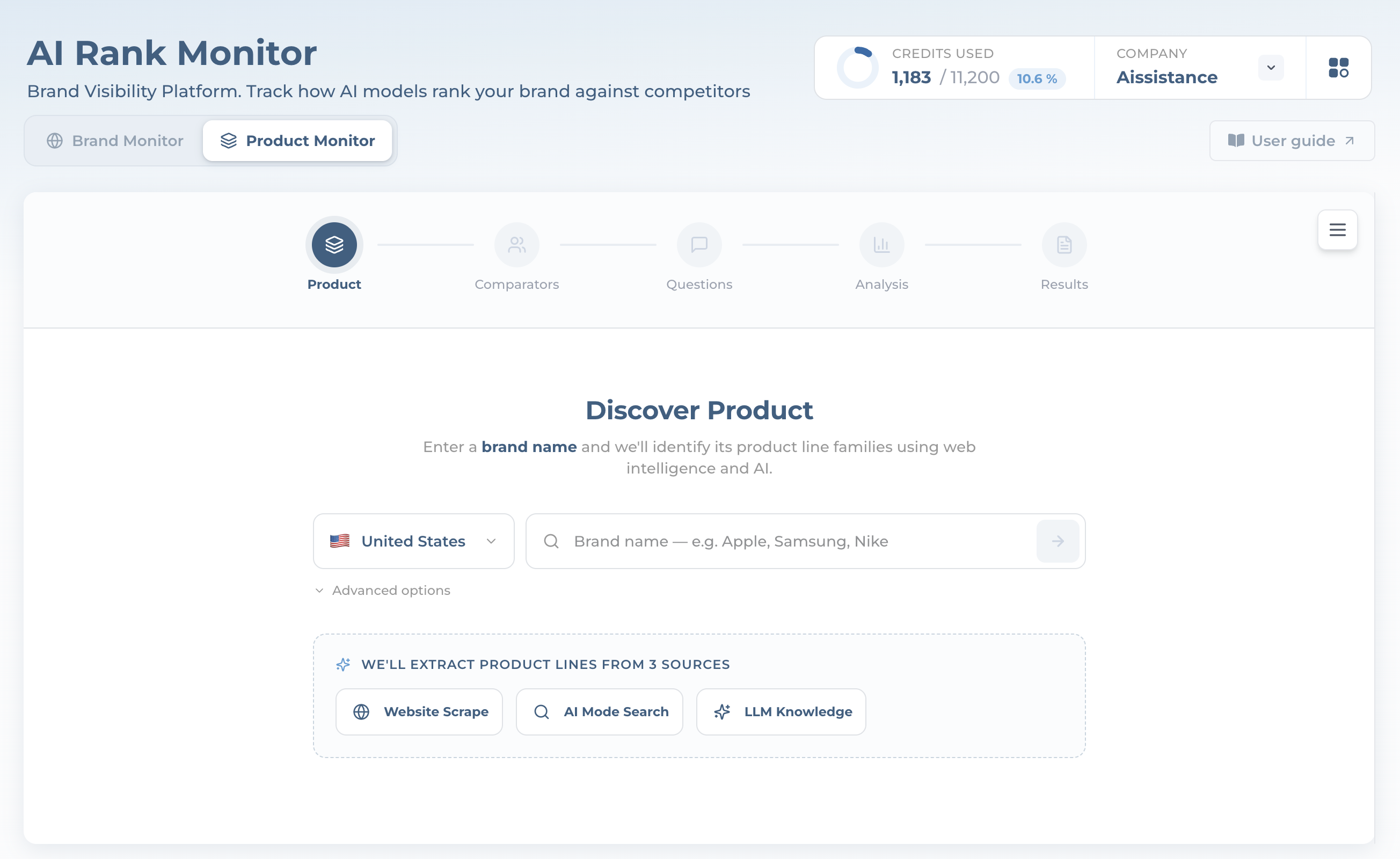
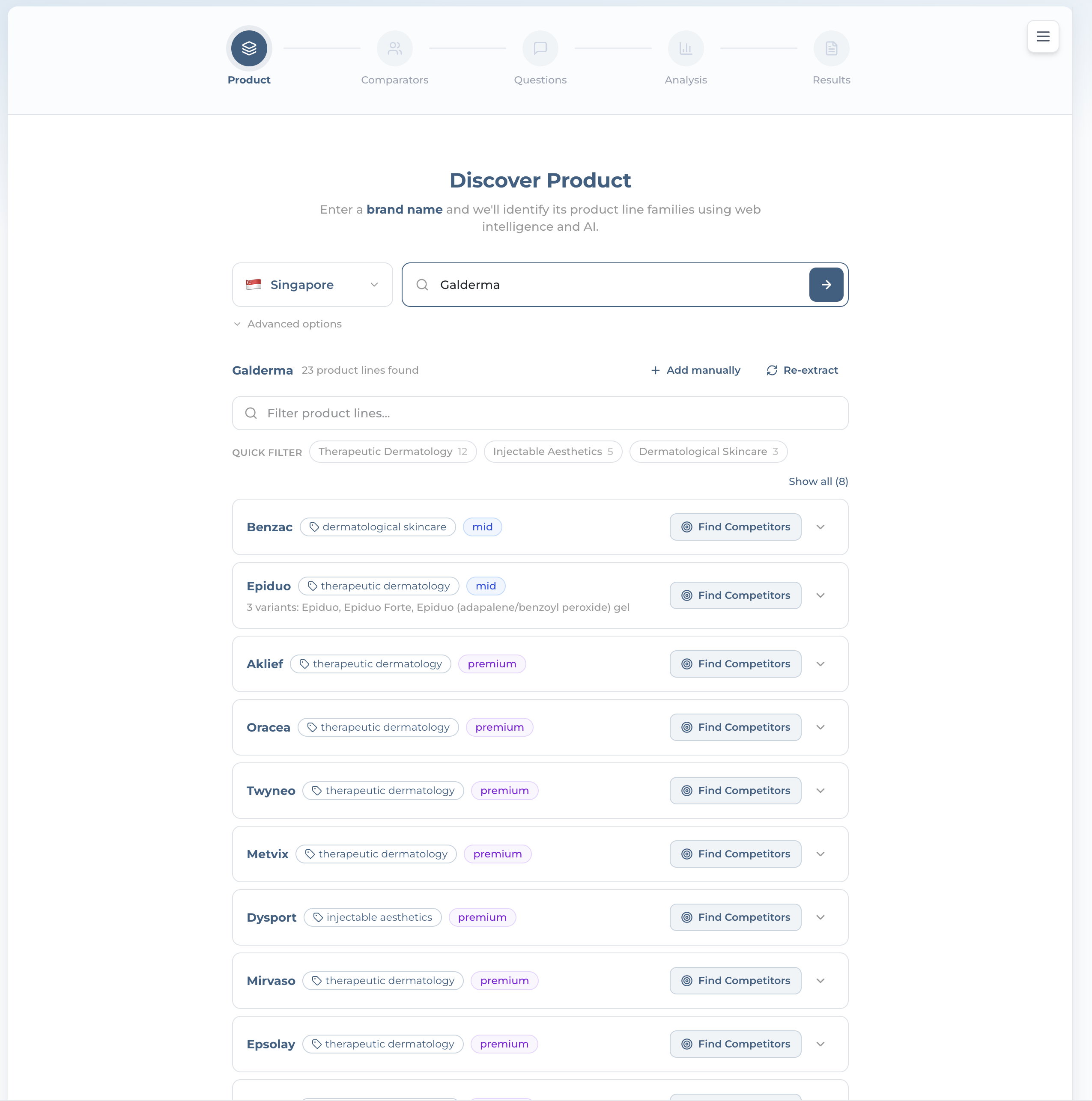
Discover Product screen with a brand-name field and three extraction sources
Step 1

Discover Your Product Lines

  • Product Monitor starts from a brand name — e.g. Galderma. A brand name is required here; there’s no URL-only path
  • It extracts the brand’s product-line families from 3 sources: Website Scrape, AI Mode Search, and LLM Knowledge
  • Set the market first, just like Brand Monitor. Discovery is free
Ai-ssistance EcommerceIQ — Market Insights
Product-line catalog for a brand with category and price-tier tags and Find Competitors buttons
Step 2

Pick a Product Line

  • You get the brand’s catalog — e.g. Galderma · 23 product lines — each tagged with a category and a price tier (budget / mid / premium / luxury)
  • Aliases (alternate names AI might use) help match mentions back to the right line; Variants group its sub-products
  • Use the filter box, Add manually, or Re-extract, then hit Find Competitors on the line you want to track
Ai-ssistance EcommerceIQ — Market Insights
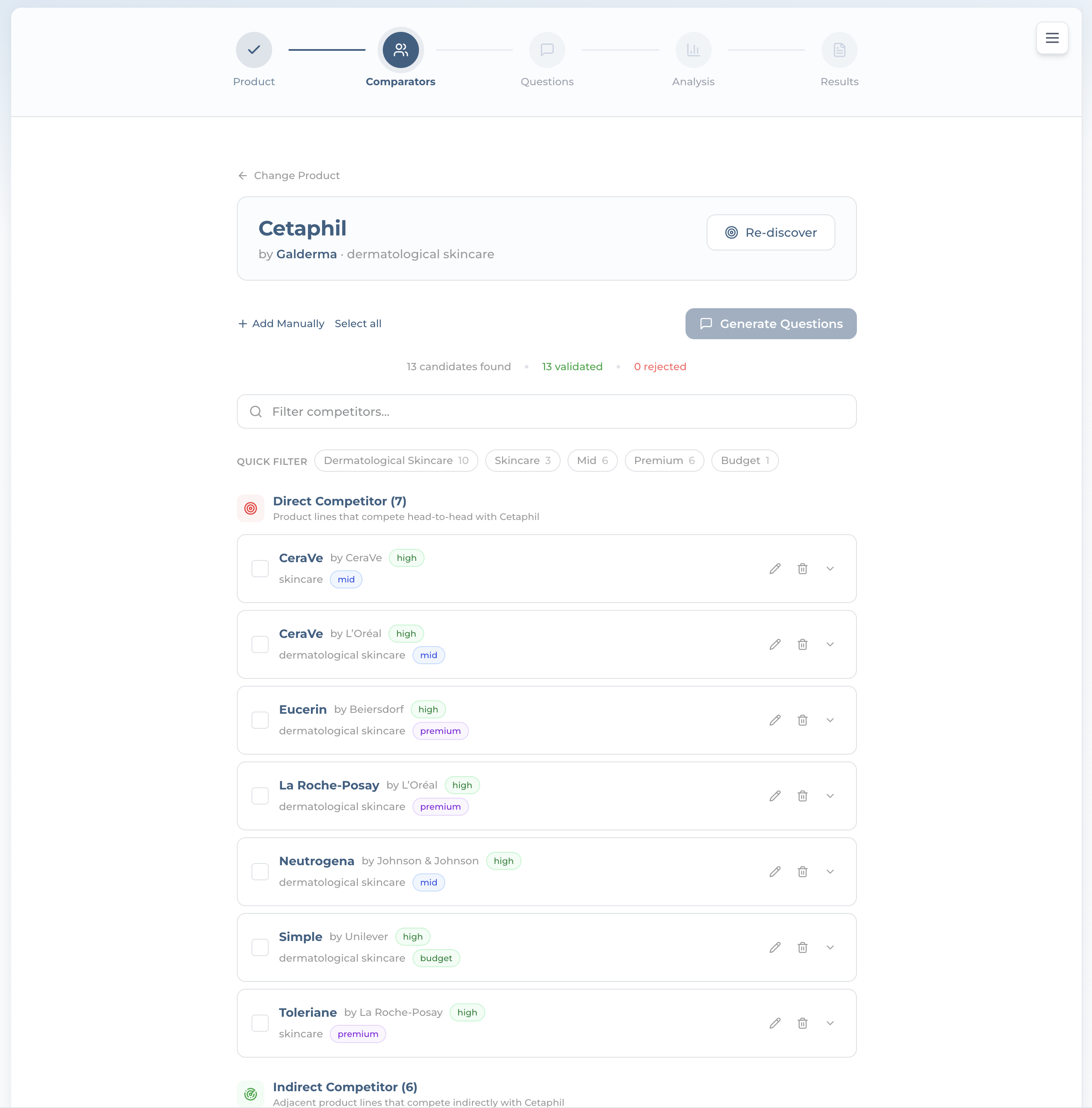
Comparator products split into Direct and Indirect competitors with confidence badges and price tiers
Step 3

Choose Comparator Products

  • It finds rival product lines and validates each, split into Direct (head-to-head) and Indirect (adjacent) competitors
  • Each card shows the parent brand, a confidence badge, category, and price tier — so you compare like with like
  • Keep the ones that matter, then Generate Questions
Ai-ssistance EcommerceIQ — Market Insights
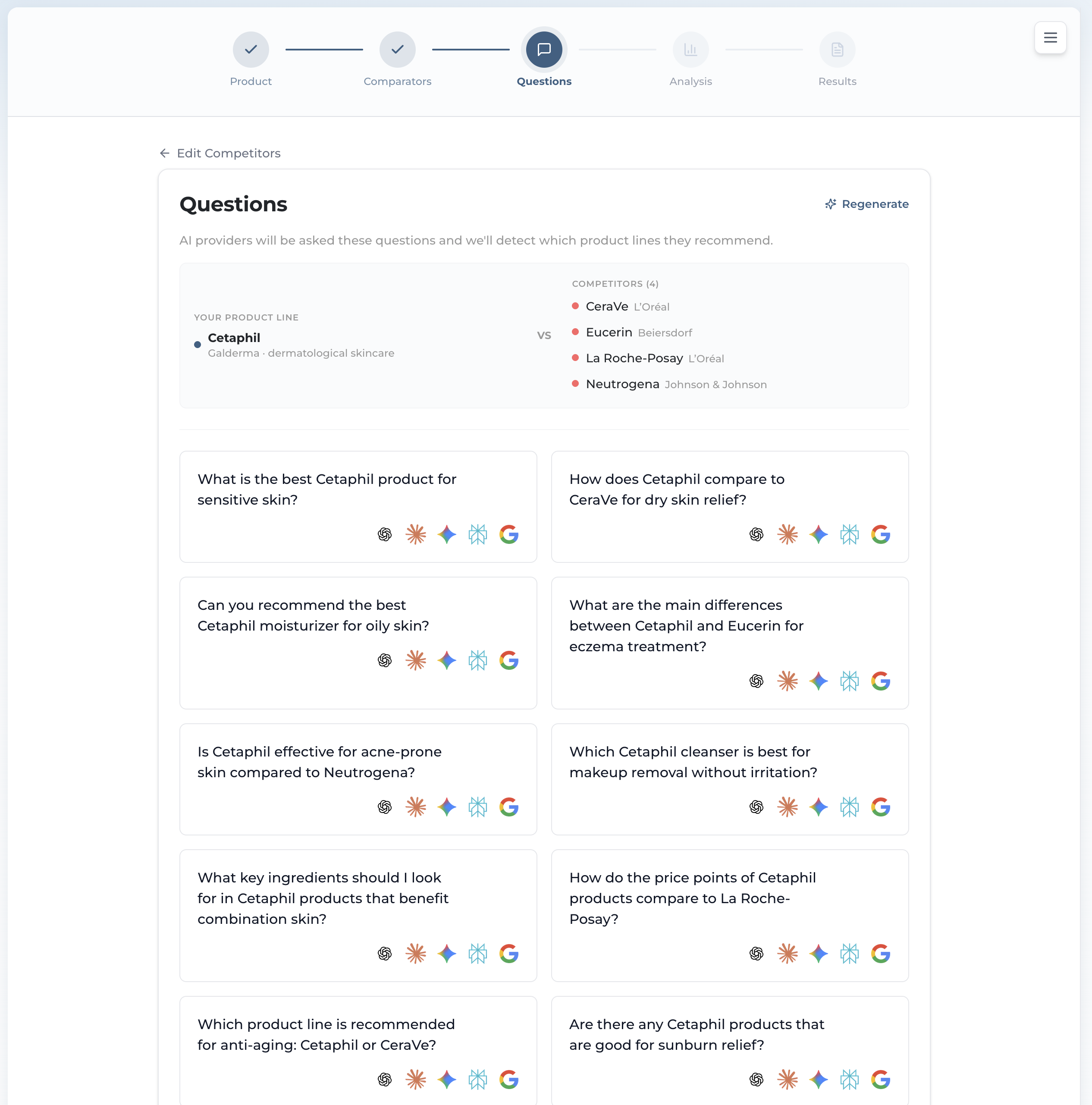
Product-focused buyer questions that name the brand, each with five provider icons
Step 4

Review the Questions

  • Here the questions do name your brand — e.g. “What’s the best Cetaphil moisturizer for oily skin?” — because we’re detecting which product lines AI recommends
  • Edit, remove, or add your own (up to 50). High Effort Mode works the same as Brand Monitor
  • Start Analysis runs it — same 10 / 20 credit cost. The live progress screen is identical to Brand Monitor’s
Ai-ssistance EcommerceIQ — Market Insights
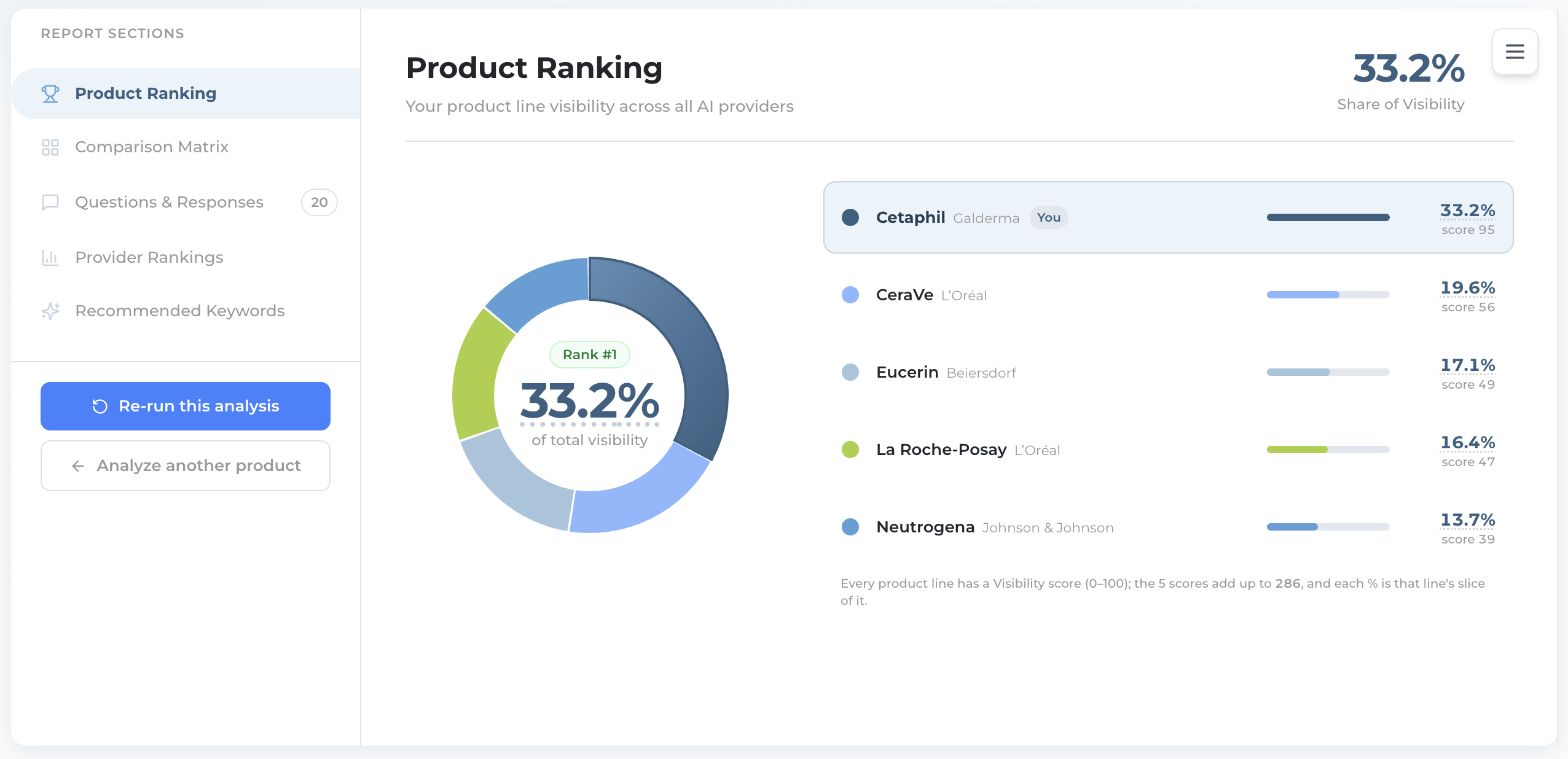
Product Ranking donut with Cetaphil at Rank 1 and a ranked legend of product lines
Results · Product Ranking

Where Your Product Ranks

  • Same donut as Brand Monitor, but across product lines. Cetaphil lands Rank #1 at 33.2% Share of Visibility
  • The legend shows each line with its parent brand, a bar, and its Visibility score. It names the top 8 and folds the rest into Other, pinning your own line even when it ranks below 8th
  • Footnote: same share math as Brand Monitor. Every line’s Visibility score (0–100) adds into a total, and each % is that line’s slice of it
Ai-ssistance EcommerceIQ — Market Insights
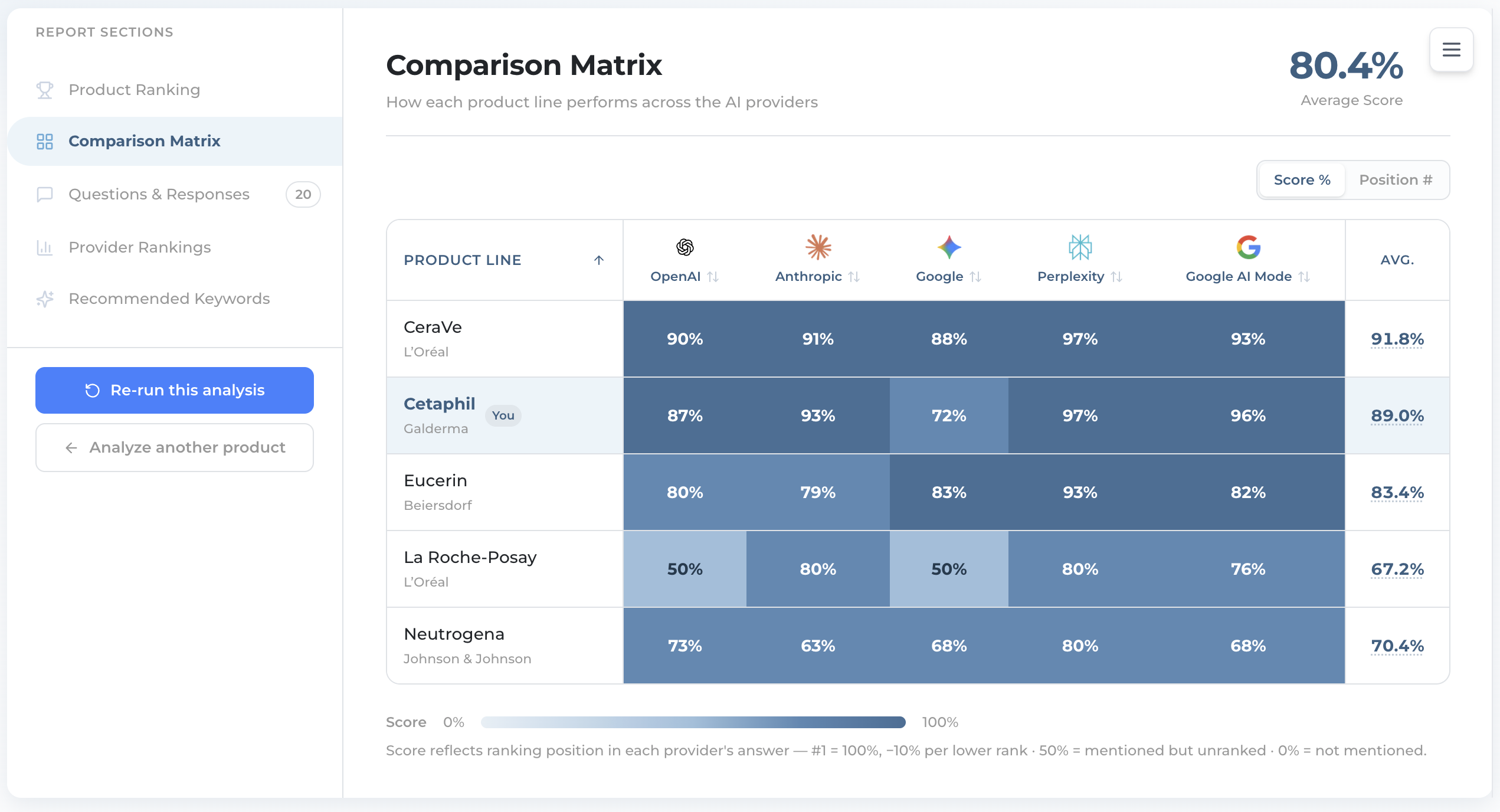
Product comparison matrix heat-map using rank-based Score % across the five AIs
Results · Comparison Matrix

Who Wins on Which AI

  • Same heat-map shape as Brand — but Product cells are a rank Score (0–100), not a Coverage percentage
  • Score reflects ranking position: #1 = 100, −10 per lower rank; 50 = mentioned but unranked; 0 = not mentioned. The toggle reads Score % / Position #, but that number is a rank score, not a share of anything
  • The KPI up top is Average Score across every line and AI
Ai-ssistance EcommerceIQ — Market Insights
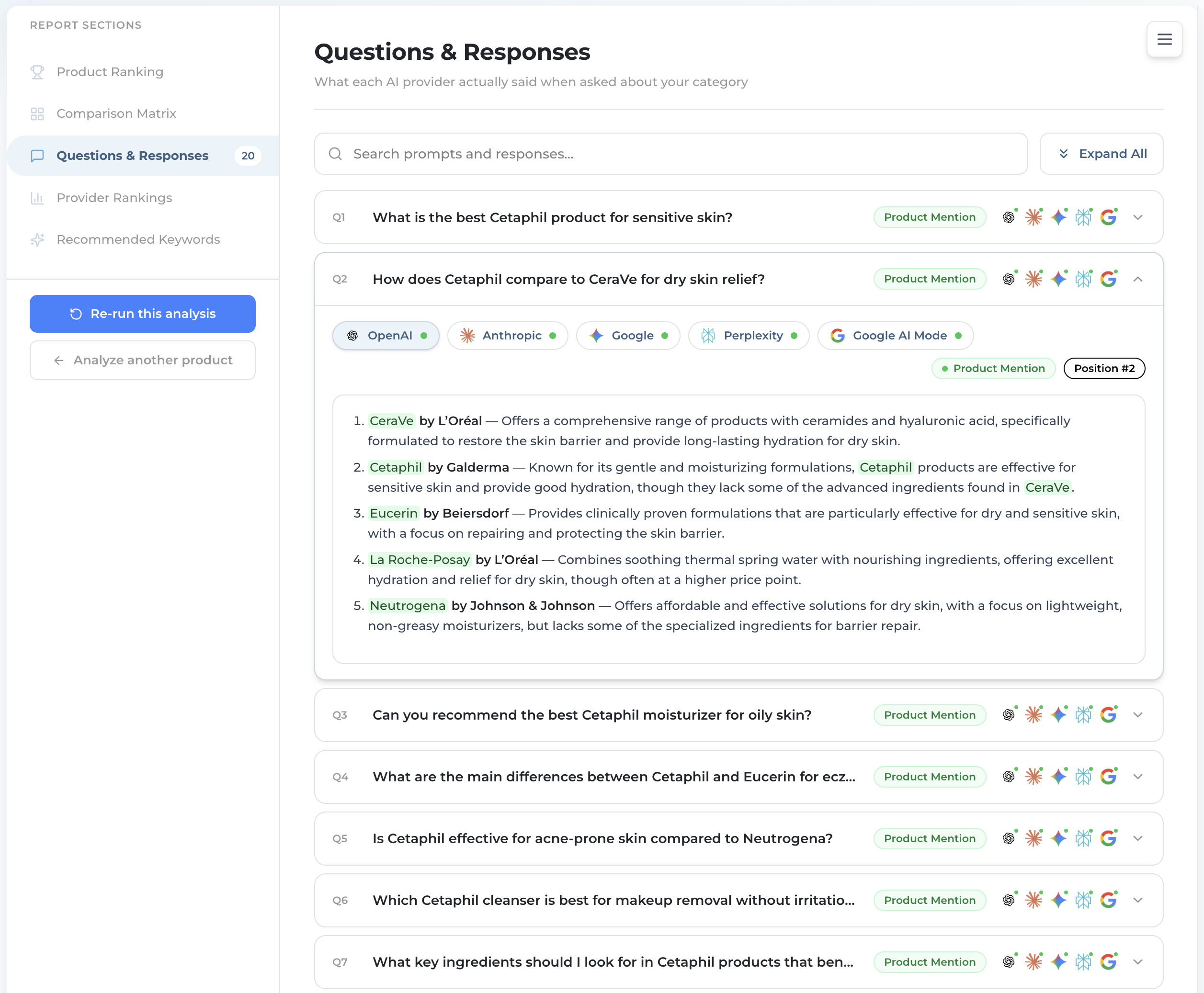
An expanded product question showing a provider's verbatim answer with a Product Mention badge and position tag
Results · Questions & Responses

What Each AI Said About Your Products

  • Read each AI’s answer verbatim, with a green “Product Mention” badge and a “Position #N” tag
  • Answers rank products with their parent brand — e.g. “Cetaphil by Galderma”
  • Switch provider tabs to compare across all five AIs
Ai-ssistance EcommerceIQ — Market Insights
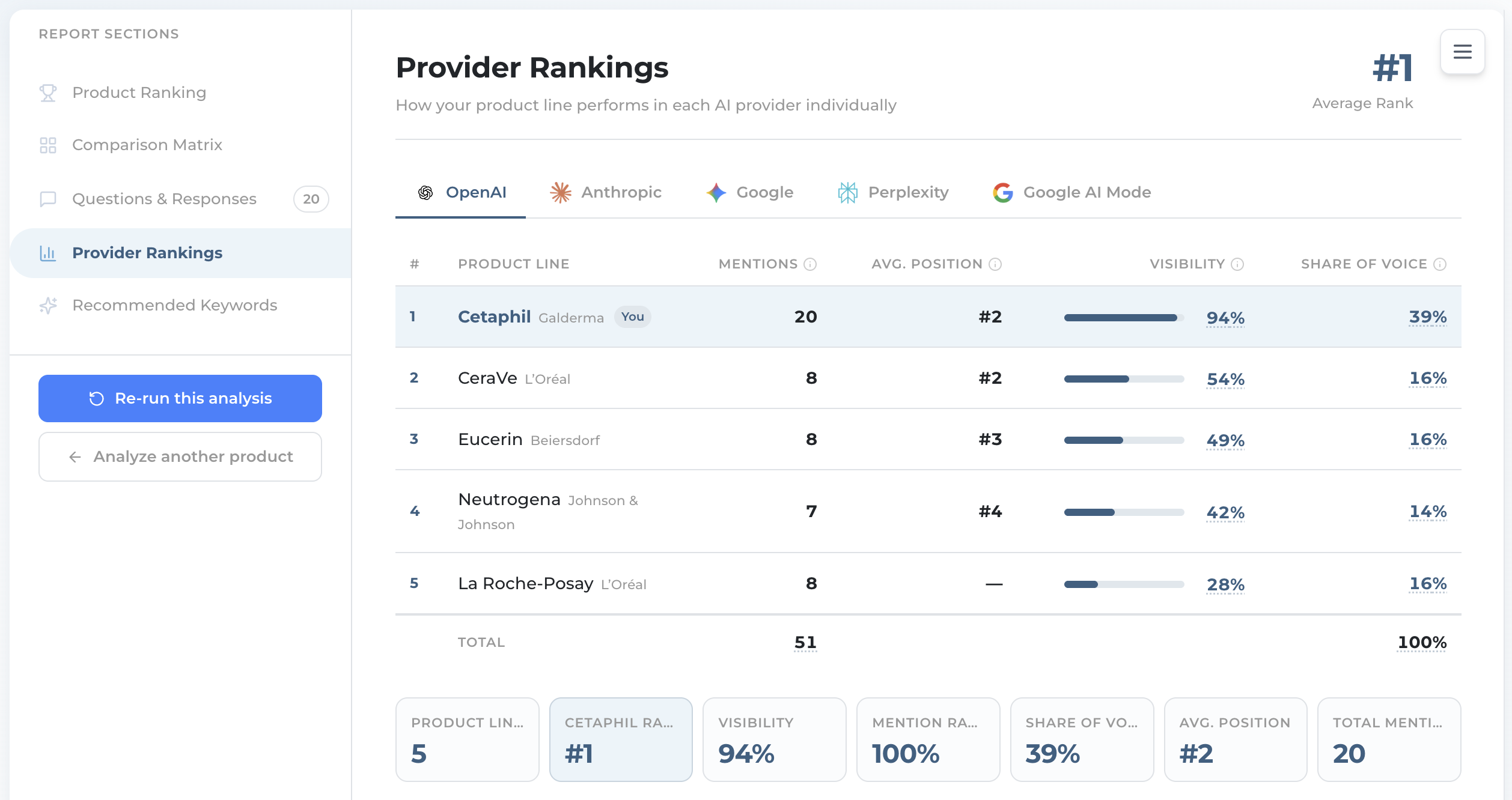
Product provider rankings table with mentions, average position, visibility and share of voice, no sentiment column
Results · Provider Rankings

Drill Into One AI

  • The table ranks every line by Visibility, with Mentions, Avg. Position and Share of Voice. Note: no Sentiment column in Product Monitor
  • Stat cards: product lines, your rank, visibility, mention rate, share of voice, avg position, total mentions
  • The same three charts sit under the table, product-scoped: Share of Voice bubble, the Visibility breakdown — next slide — and Position across all AIs
Ai-ssistance EcommerceIQ — Market Insights
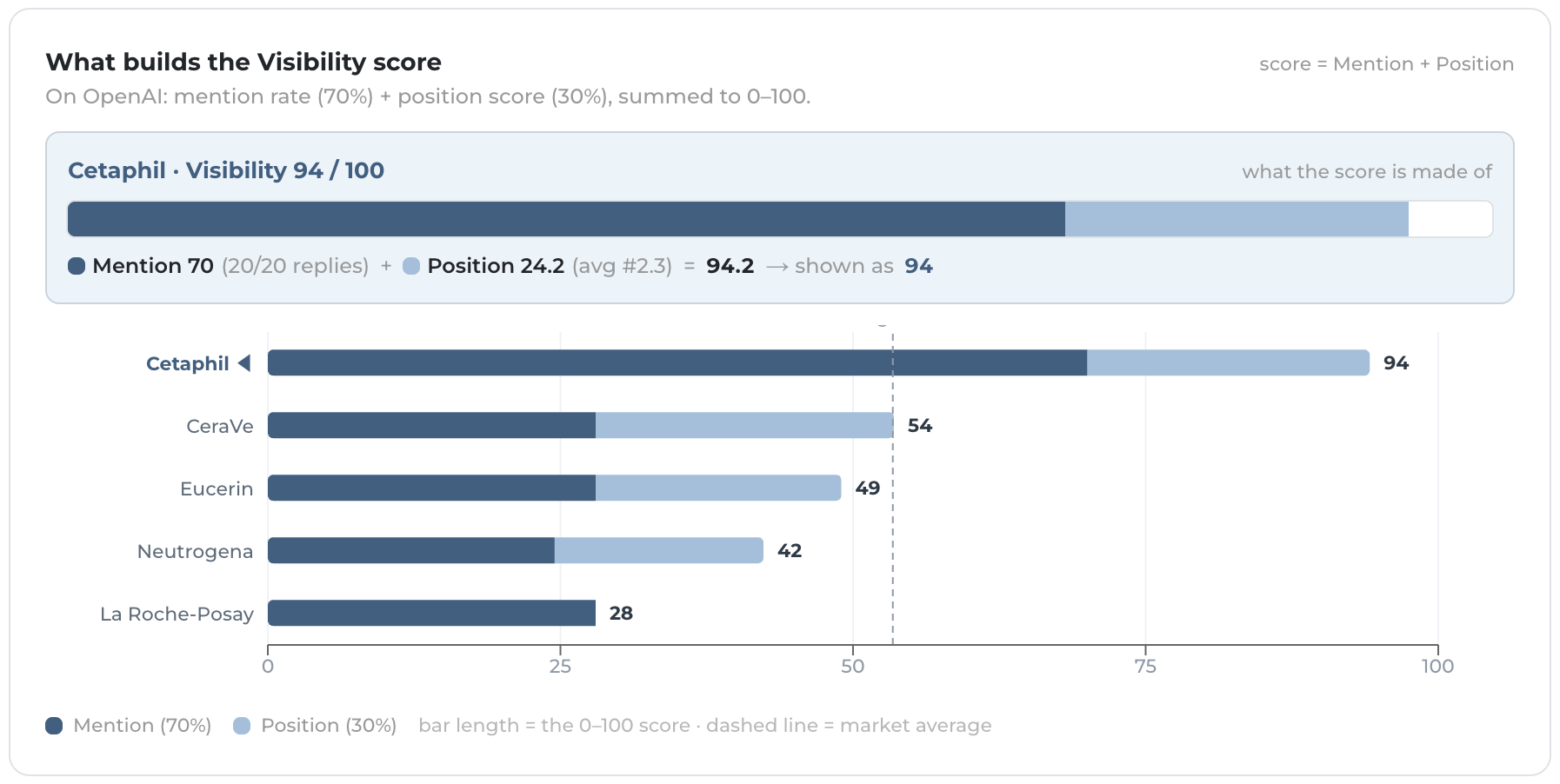
Product visibility breakdown showing mention rate and position score combining into the score
Results · Provider Rankings

How the Product Score Is Built

  • On the same Provider Rankings tab as the last step, scroll past the table to the chart headed “What builds the Visibility score”. Brand’s version sits in the same spot but is headed Visibility · {the AI you picked}
  • Product Visibility is Mention 70% + Position 30%, simpler than Brand (no Listed bonus, no keyword term)
  • Position score = 100 − (avg rank − 1) × 15, so every rank below #1 costs 15 points
  • That’s why a product ranked #1 across AIs can post a much higher Visibility than a brand with the same mention rate
Ai-ssistance EcommerceIQ — Market Insights
Product recommended keywords with an optimization score, performance buckets and provider insights
Results · Recommended Keywords

Where to Improve

  • Same as Brand Monitor: a Keyword Optimization Score, Winning / Competitive / Missing buckets, and per-provider insights — scoped to your product line
  • Use it to spot terms the AIs tie to rival lines but not yours
  • Export the list to brief your content team
Ai-ssistance EcommerceIQ — Market Insights
Product Monitor Sources tab showing the same platform reach, heat map and top-sites charts scoped to a product line
Results · Sources

Where Product Answers Came From

  • Sources is the last tab here too, and it is the same view as Brand Monitor’s — the three charts and the site cards, scoped to this product-line run
  • This is where retailer and review pages surface: if Lazada, Shopee or a review site is what the AIs read about your category, it shows up here with its citation count
  • Cited pages arrive with different detail per AI — Perplexity returns links without page titles, and Google’s link is a redirect. Both still render as the site, so no row is ever blank
Ai-ssistance EcommerceIQ — Market Insights
Product vs Brand

How Product Monitor Differs

Same six report sections — but a few things change when you go product-level.

Starts from a brand Enter a brand, pick a product line, then compare it against rival lines — Direct & Indirect.
Visibility 70 / 30 Mention 70% + Position 30% — no Listed bonus, no keyword term.
Matrix = rank Score A rank score of 0–100 (#1 = 100, −10 per rank), not a Coverage percentage.
No Sentiment Product Monitor doesn’t score tone. Everything else mirrors Brand Monitor.
Ai-ssistance EcommerceIQ — Market Insights
04

Manage, Export & Schedule

Every run is saved — revisit it, export it, and put it on a schedule

Ai-ssistance EcommerceIQ — Market Insights
Analysis history sidebar listing past analyses with the newest on top and a New Analysis button
History

Revisit & Re-run

  • Open the History sidebar (the ☰ button) for every past analysis — brand or line, market, and when you ran it
  • Click any entry to reload its full results instantly — no credits. Each tab keeps its own history
  • Re-run this analysis refreshes the same setup; + New Analysis / Analyze another starts fresh. To track movement without remembering, put it on a schedule instead — next slides
Ai-ssistance EcommerceIQ — Market Insights
Results view with the Export PDF button in the Report Sections rail and the downloaded report
Export

Take the Report With You

  • Export PDF sits in the left Report Sections rail, under the tab list — same button on both monitors, on the results view of a saved analysis. It downloads straight away; there’s no job to wait for and nothing is emailed
  • You get five sections: Brand (or Product) Ranking, Competitors / Comparators, Comparison Matrix, Provider Rankings, and Questions & Responses. The visibility donut is the only chart that crosses over
  • It’s a summary, not the full record: answers are cut at 1,200 characters and 8 per question, the matrix at 8 competitors, Provider Rankings at 10 rows, and there is no Share of Voice tile
  • Thai text renders properly — the report carries its own Thai font, so nothing turns into boxes
Two tabs stay portal-only and are not in the PDF: Sources and Recommended Keywords
Ai-ssistance EcommerceIQ — Market Insights
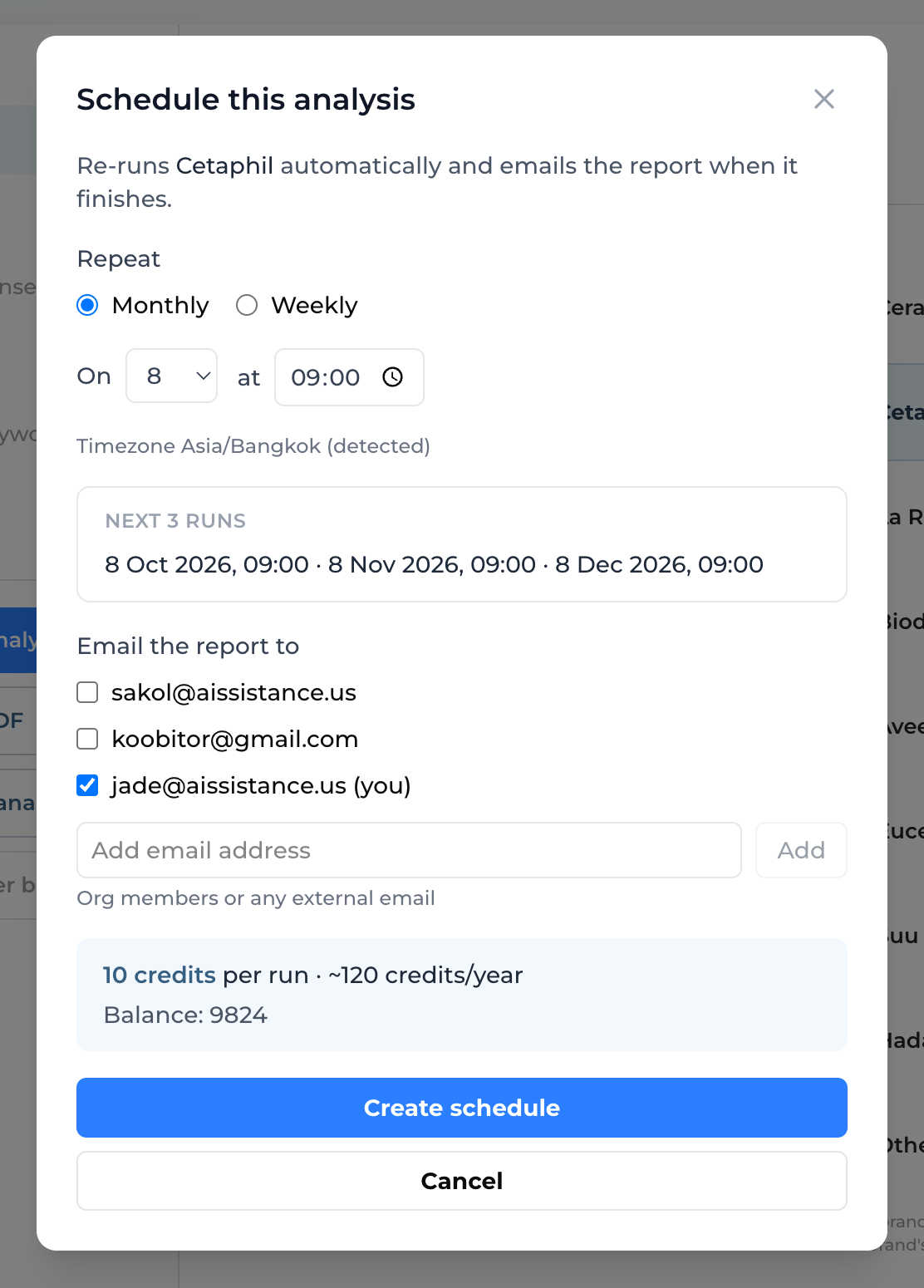
Schedule this analysis dialog with the Monthly and Weekly options, day and time pickers, recipients and the credit cost line
Schedule

Put It on Repeat

  • From any finished analysis, click Schedule this analysis in the same rail. It re-runs the saved setup automatically and emails the report each time
  • Repeat offers Monthly or Weekly. Pick the day and time; the timezone is detected from your browser and can’t be changed here, and “Next 3 runs” previews the dates before you commit
  • Email the report to — tick org members or type any external address, up to 20. Works the same for a brand or a product line
  • A run starts around the time you picked rather than on the second, and it inherits High Effort from the analysis you scheduled it from
Creating a schedule is free — each run bills like a manual one at 10 credits (20 in High Effort). The dialog shows the yearly estimate before you commit
Ai-ssistance EcommerceIQ — Market Insights
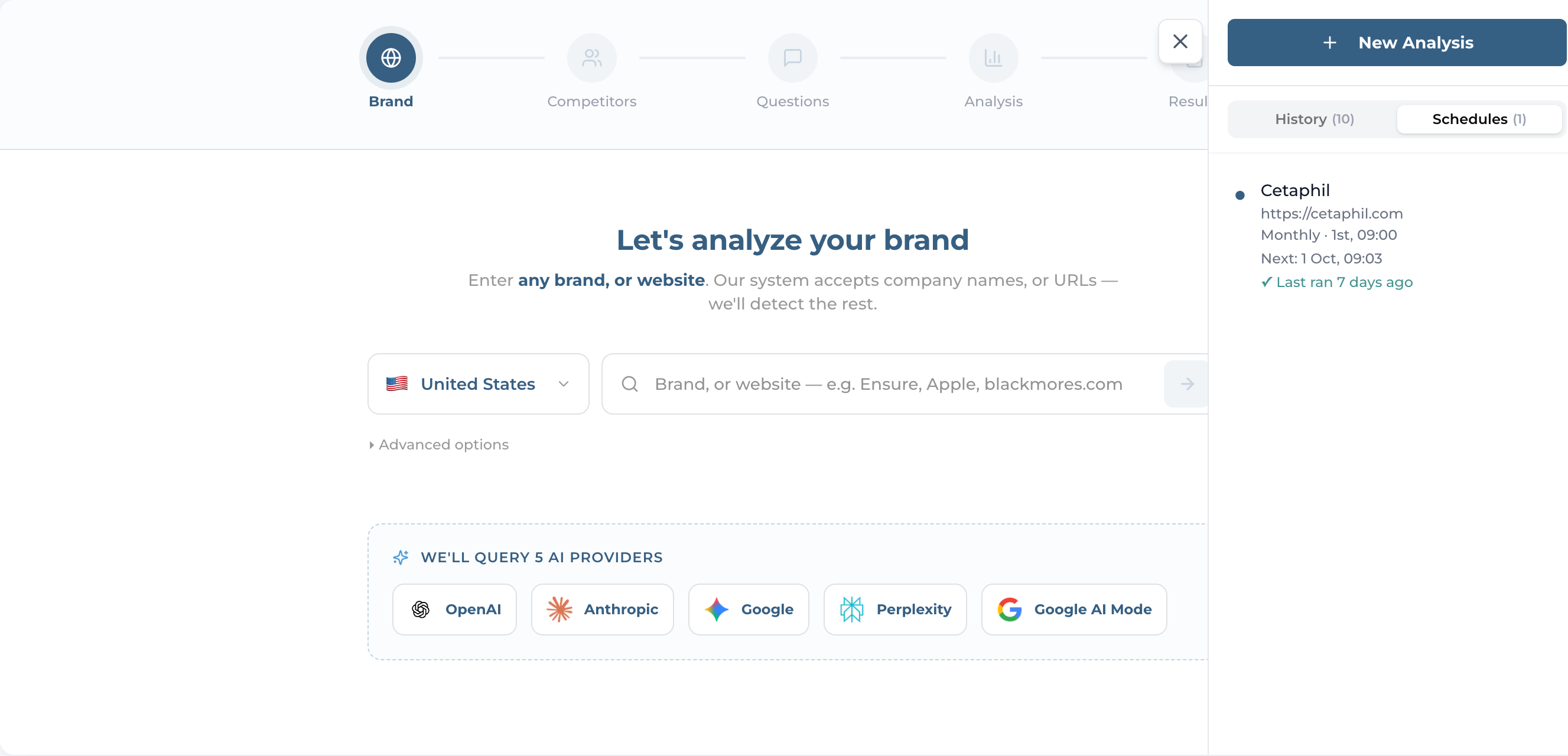
Schedules tab in the sidebar listing a schedule with its cadence and next run, beside the Manage schedule dialog
Schedule

Pause, Edit, or Stop It

  • The sidebar has a Schedules tab next to History. Each row reads its cadence and next date — Monthly · 15th, 09:00 · Next: 15 Sep — plus its last outcome. Brand and product schedules each sit under their own monitor; there is no combined list
  • Open one for Manage schedule: change the day, time or recipients, Pause and resume, or Run now for an immediate run (which costs a full run’s credits). Edits are locked while a run is in progress
  • Cancel schedule is final — it stops for good and drops off the list, so create a new one if you change your mind
Resuming a paused schedule recomputes the next run from today. It does not fire the run you missed
Ai-ssistance EcommerceIQ — Market Insights
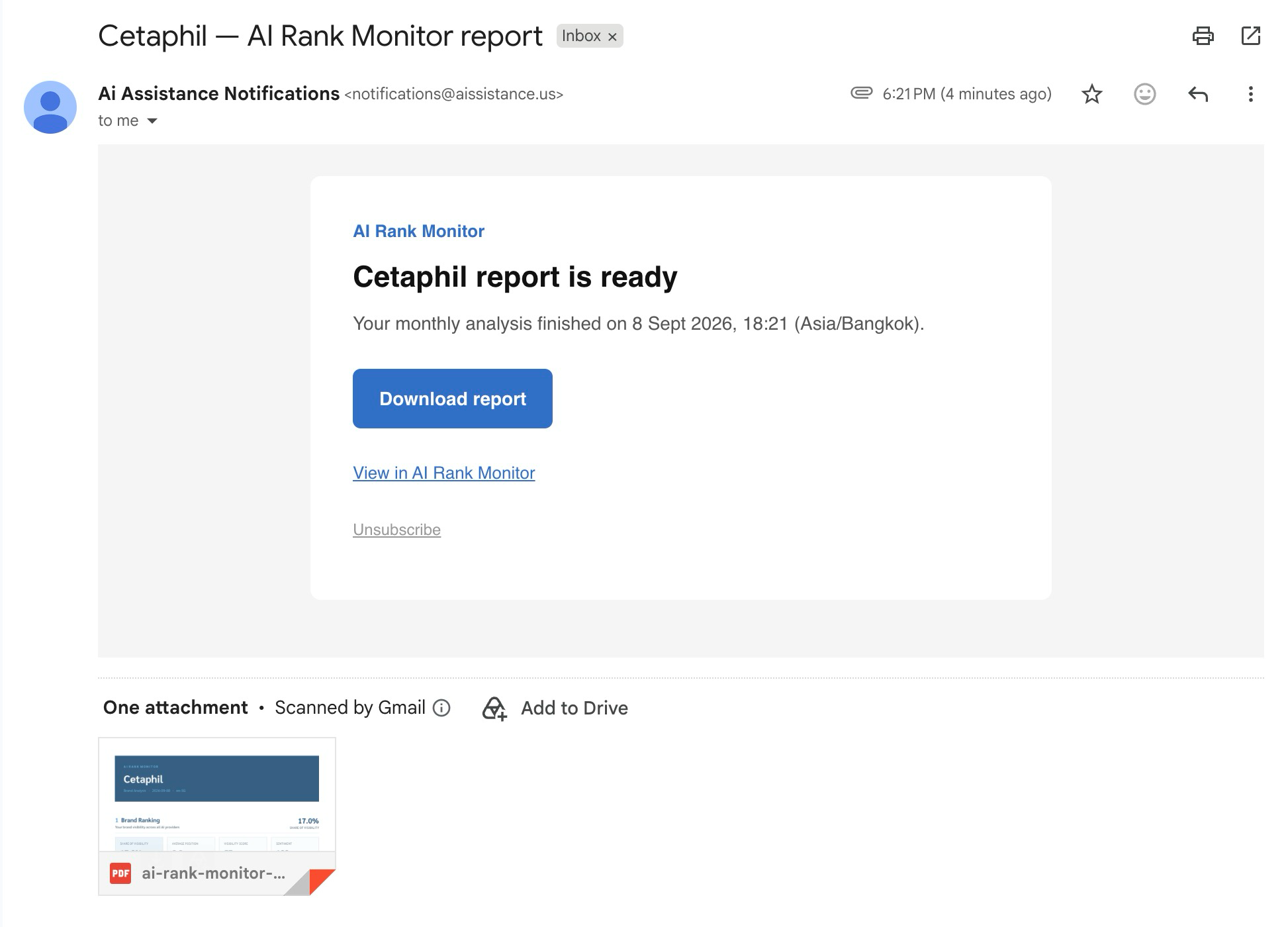
Completion email with the report-is-ready headline, the Download report button and the PDF attached
Schedule

What Lands in Your Inbox

  • When a scheduled run finishes, every recipient gets one email — subject “{Your brand} — AI Rank Monitor report” (or Product Monitor report), headed “…report is ready”. The body carries no numbers — it is a notification, and the report itself is the PDF
  • The PDF is attached, and a Download report button covers the case where it was too large to attach. That link is single-use and expires in 7 days
  • View in AI Rank Monitor opens the new run — where Sources and Recommended Keywords are waiting. On a product-line schedule the link lands on Product Monitor’s start screen instead; open that run from History in the sidebar
A failed run emails nothing at all. Out of credits and the run is skipped, not failed — the schedule stays active and you get one top-up email, then at most one more every 30 days
Ai-ssistance EcommerceIQ — Market Insights
05

FAQ & Tips

The questions every first-time user asks

Ai-ssistance EcommerceIQ — Market Insights
FAQ · Cost

Credits & Cost

What you pay, and when.

How much? A standard analysis is 10 credits; High Effort is 20. Identifying the company, finding competitors and comparators, generating questions, and discovering product lines are all free.
When am I charged? When the analysis runs. The setup steps before it cost nothing.
What about a scheduled run? The same 10 credits (20 in High Effort) — a schedule is billed per run, at the same price as running it by hand. So is “Run now”. The create dialog shows the yearly estimate before you commit.
Out of credits? You can still browse past results, but “Start Analysis” is blocked until your organization tops up. A scheduled run is skipped rather than failed, and resumes on its own after a top-up.
Ai-ssistance EcommerceIQ — Market Insights
FAQ · Accuracy

Why Results Move

AI answers aren’t fixed — here’s how to read them right.

It’s a snapshot Models answer a little differently each time, and shift month to month. One run is a reading, not a verdict.
High Effort Mode Asking each provider 5× and averaging cuts the noise. Use it when a score sits on the fence, or for a report.
If an AI doesn’t answer Calls fail per prompt, not per provider — an AI might answer 7 of 10. Failed calls are dropped, not scored as zero, so they shrink the sample rather than dragging you down. Questions & Responses flags each one.
Ai-ssistance EcommerceIQ — Market Insights
FAQ · Tips

Getting Sharper Results

Small inputs, big difference.

Set the right market The market (locale) drives the questions and the brands AI surfaces. Set the market you sell in — not the US default.
Curate competitors Drop irrelevant rivals, add the ones that matter. The competitor set is the yardstick every score is measured against.
Name, not URL A brand name is first-class and often more reliable than a URL — AI Mode can profile it without a website. Product Monitor needs a brand name.
“Session expired”? Your login lapsed — sign in again. The tool also needs a selected organization with credits to run.
Ai-ssistance EcommerceIQ — Market Insights
EcommerceIQ — Market Insights Ai-ssistance

Start Monitoring

Know what AI says about your brand and your products — before your customers do.

aissistance.us